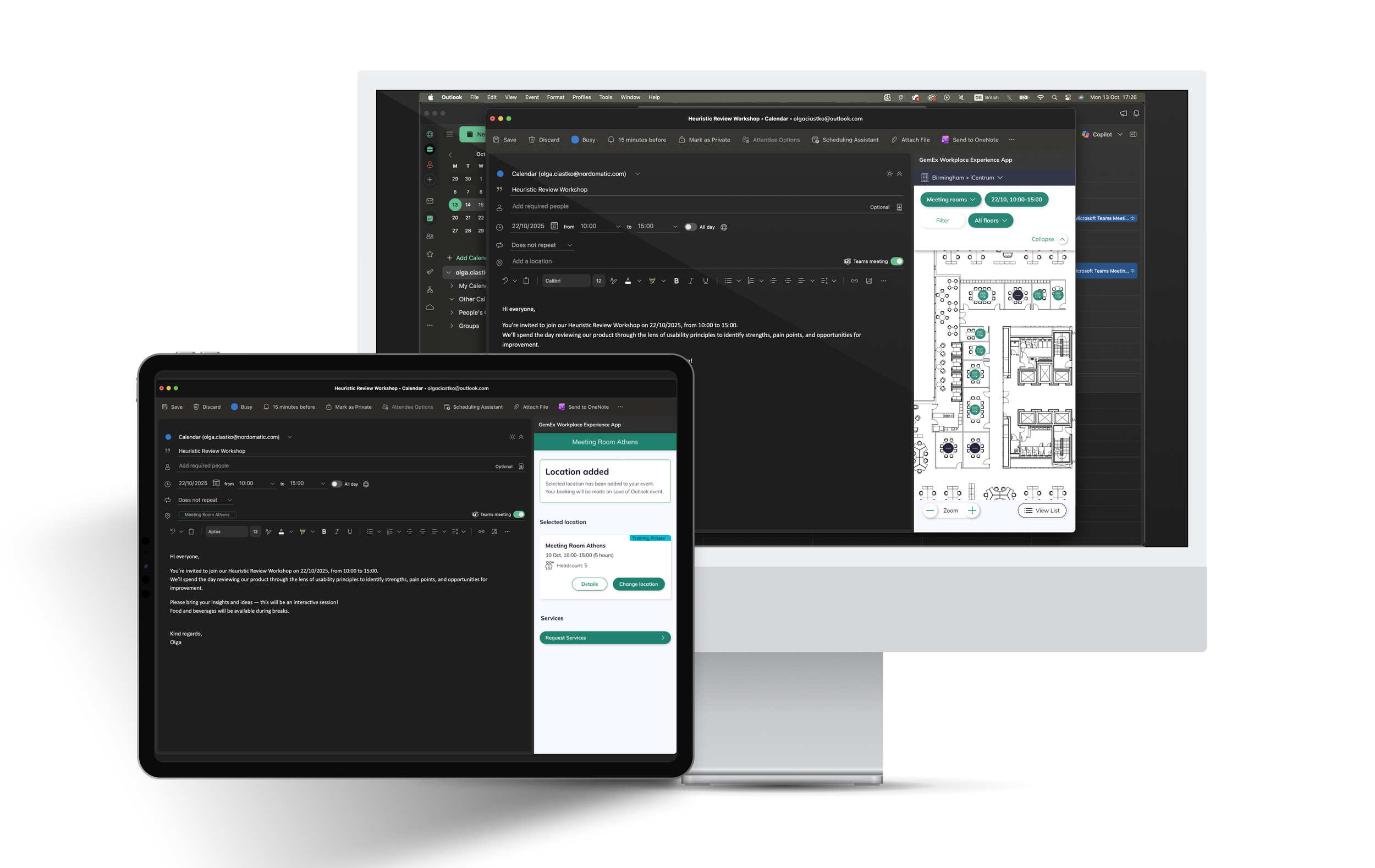
Seamless bookings. Familiar experience.
Designing GemEx for Outlook - connecting Workplace Experience App with everyday workflows.
Timeline
January 2023 - March 2024
May 2025 - December 2025
Client
M&G
Team
Product Designer (me!)
Product Owner
Developers team
Tools
Figma + FigJam
Lucid
Microsoft Office Outlook
Context
GemEx is an enterprise-grade workplace experience platform, but enterprise employees live in Microsoft Outlook, not third-party apps.
In fact, internal data showed that over 63% of users preferred accessing GemEx App via the web version during their working day, highlighting just how naturally the experience needed to fit into existing digital workflows rather than compete with them.
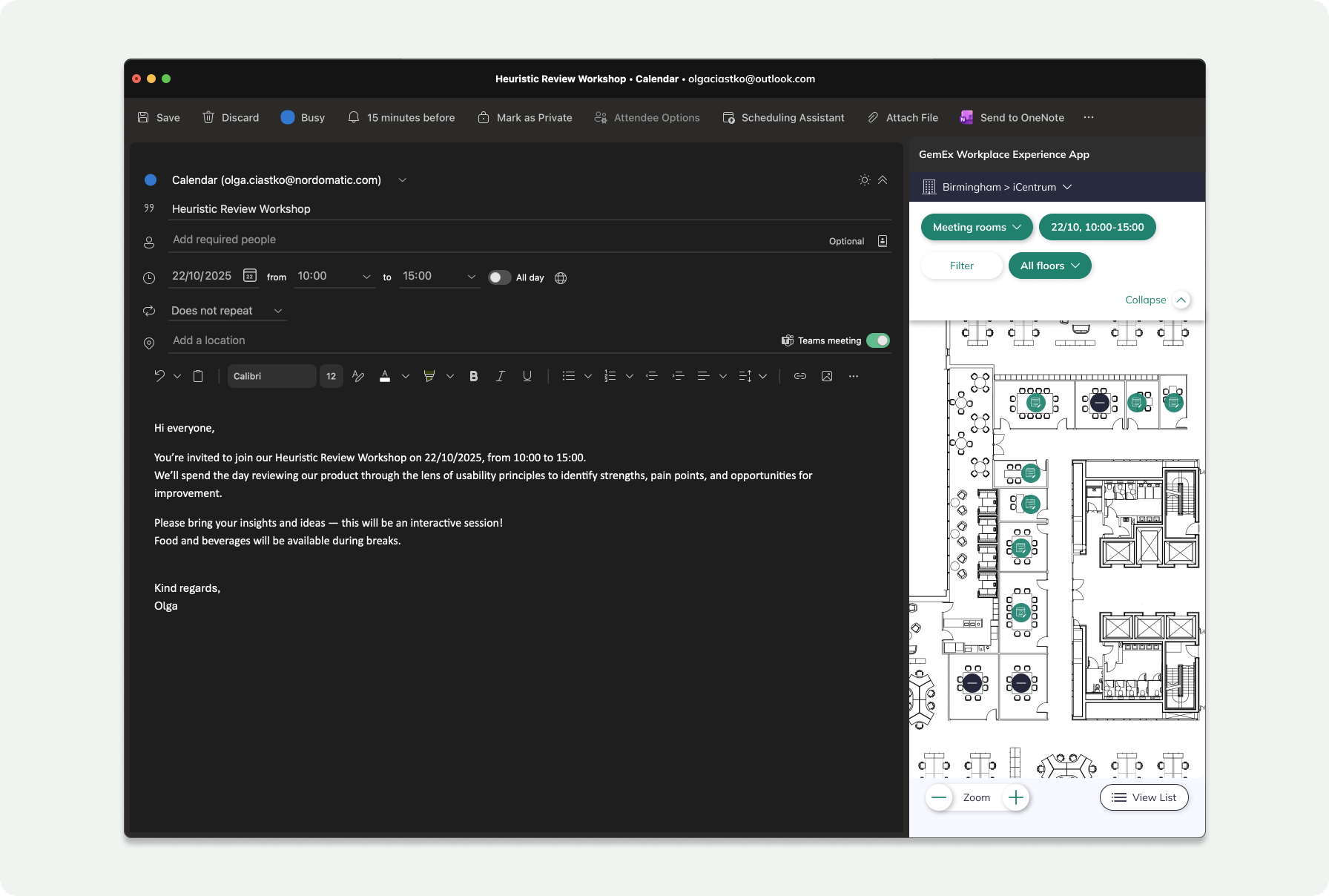
The existing plugin addressed only basic room booking, forcing users to context-switch whenever they needed to manage more complex requirements: catering orders, visitor registration, or booking categorisation.
The client described the problem in their own words:
"We had solutions for booking meeting rooms or a car park space but they were all on different systems. We didn't have anything integrated. We wanted something fundamentally different... fast, dynamic, and very user friendly."
— Sarah O'Reilly, Global Head of CRE Workplace Solutions, M&G
Challenge
The core challenge was achieving feature parity between the full GemEx mobile app and the highly constrained Outlook environment, while ensuring the experience felt native and effortless, not like a stripped-down compromise.
Beyond the UX complexity, there was a significant technical hurdle: integrating sophisticated service logic: catering menus, visitor security protocols, real-time availability into Outlook's rigid sidebar framework without introducing data sync conflicts or latency issues.
Goals
The goal was clear: bring the full GemEx app experience into Outlook - the tool employees already live in, so users could edit reservations, add details, and request services without ever switching context.
Beyond feature parity, the ambition was to build user confidence in the plugin as a genuinely capable, self-sufficient tool. With over 63% of users already preferring the web version, the opportunity was there, if the plugin could meet the same bar, it had real potential to become the default booking channel for users still relying on reception desks or fragmented internal tools.
The broader objective: make GemEx an indispensable part of the daily workflow, regardless of which surface users chose.
Process
I joined when the basic create-a-room-booking flow (designed by a colleague) was mid-development, scoped as a pilot for M&G's London HQ for 3,200 users.
My role was to own design through implementation - the part where concepts meet reality. I embedded with engineering, tested each developed version against the Jira user stories, and updated the Figma designs as build surfaced gaps - designing the missing states, variations and edge-case behaviours that only become visible once something is real. This is where most of the actual design decisions live, and it became my specialism on the project: not handing off a flow, but taking it all the way to shipped behaviour.
From there I owned whole features end-to-end:
Edit flow: modify a booking without leaving Outlook.
Delete flow: with a distinction I had to design carefully: remove just the room from an Outlook event (releasing the space, keeping the meeting) versus deleting the entire event.
Services in Outlook: bringing in a feature whose underlying model I already knew intimately: I'd previously designed GemEx's service configuration on the platform (a three-level hierarchy with metadata), the platform flow for a Booking Administrator to attach services to an existing booking, and the mobile services experience through to ship. That lineage let me carry the logic into Outlook coherently rather than re-inventing it.
Multi-room bookings, additional booking metadata, and visitor management: extending the plugin toward full CRUD parity with the app.
A note on collaboration, since it's the honest shape of the work: on the create flow and the original mobile services flows, another designer authored the concept and I took it from handoff through to final, shipped behaviour. On edit, delete, services-in-Outlook, multi-room and metadata, the flows were mine end-to-end. Knowing and stating, that boundary is part of working well across a design team.
The client's read on how we worked:
"It has been a bit of a revelation just watching how people use the app... the ideas that we have help Spica's product develop as well, so it's a very symbiotic relationship."
— Sarah O'Reilly, M&G
Discovery & Workflow Analysis
Discovery & Logic Mapping
My research went beyond user preferences - it was about mapping the full data lifecycle of a meeting booking and understanding the systemic logic that had to underpin the experience.
Key Architectural Insights
Context switching is a hard constraint
Enterprise users simply won't leave Outlook. If a feature wasn't available in the plugin, it was ignored entirely - with real consequences, such as visitor security protocols being bypassed altogether.
Services are dependent variables
They cannot be validated until both location and time are confirmed and saved. This created a non-negotiable requirement for a strict linear dependency in the UI flow: the interface had to enforce the correct sequence, not just suggest it.
Latency creates booking conflicts
Users often spend several minutes composing an email after selecting a room. This window introduced a significant risk of race conditions - a room appearing available to others while technically held by an active drafter, resulting in double-booking conflicts and eroded trust in the system.
Strategic Solution: Provisional Booking Logic
To resolve this, I aligned the Outlook plugin's behaviour with the existing mobile app architecture by introducing a background provisional state - invisible to the user, but critical to data integrity.
The trigger:
The moment a user selects a room, the system initiates a soft lock on the GemEx server.
The platform view:
The room is immediately marked as unavailable across the wider GemEx ecosystem, preventing concurrent selections.
The user view:
The experience remains seamless - no technical states, no friction, just a natural selection flow.
The commit:
Once the email is sent, the provisional tag is silently promoted to a confirmed status in the database.
Understanding Users
To build genuine empathy across the team, I synthesised findings from research, interviews, and observational sessions into empathy maps and a 5W+H framework. Rather than keeping insights siloed in a research document, these became shared artefacts, giving the wider team a clear window into users' daily realities and the frustrations shaping their behaviour.
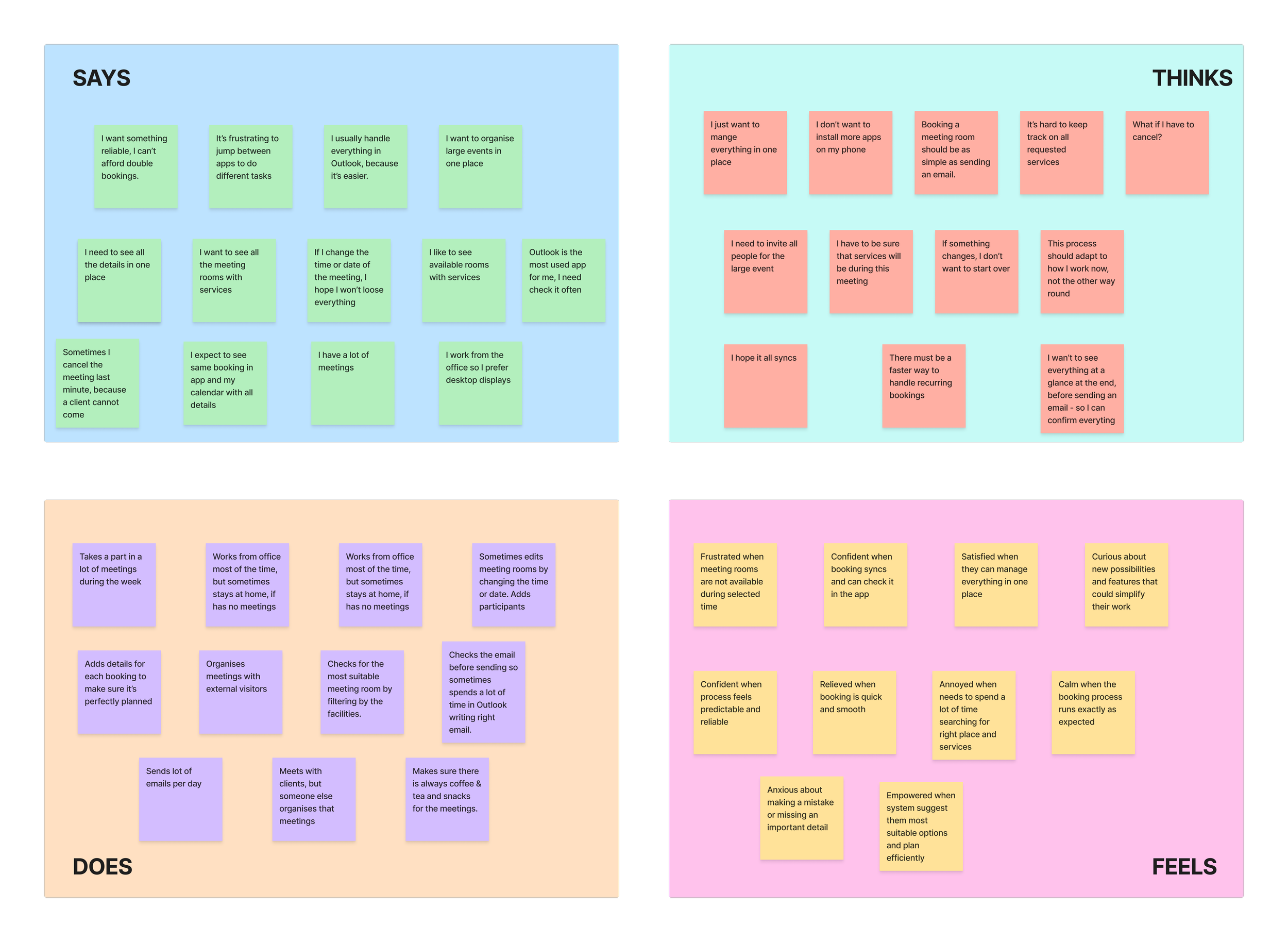
During ideation, I focused on bridging the gap between user expectations and product capability. The guiding principle was straightforward: the Outlook plugin should feel like a natural extension of the workday: familiar, useful, and frictionless, not another tool users have to learn to tolerate.
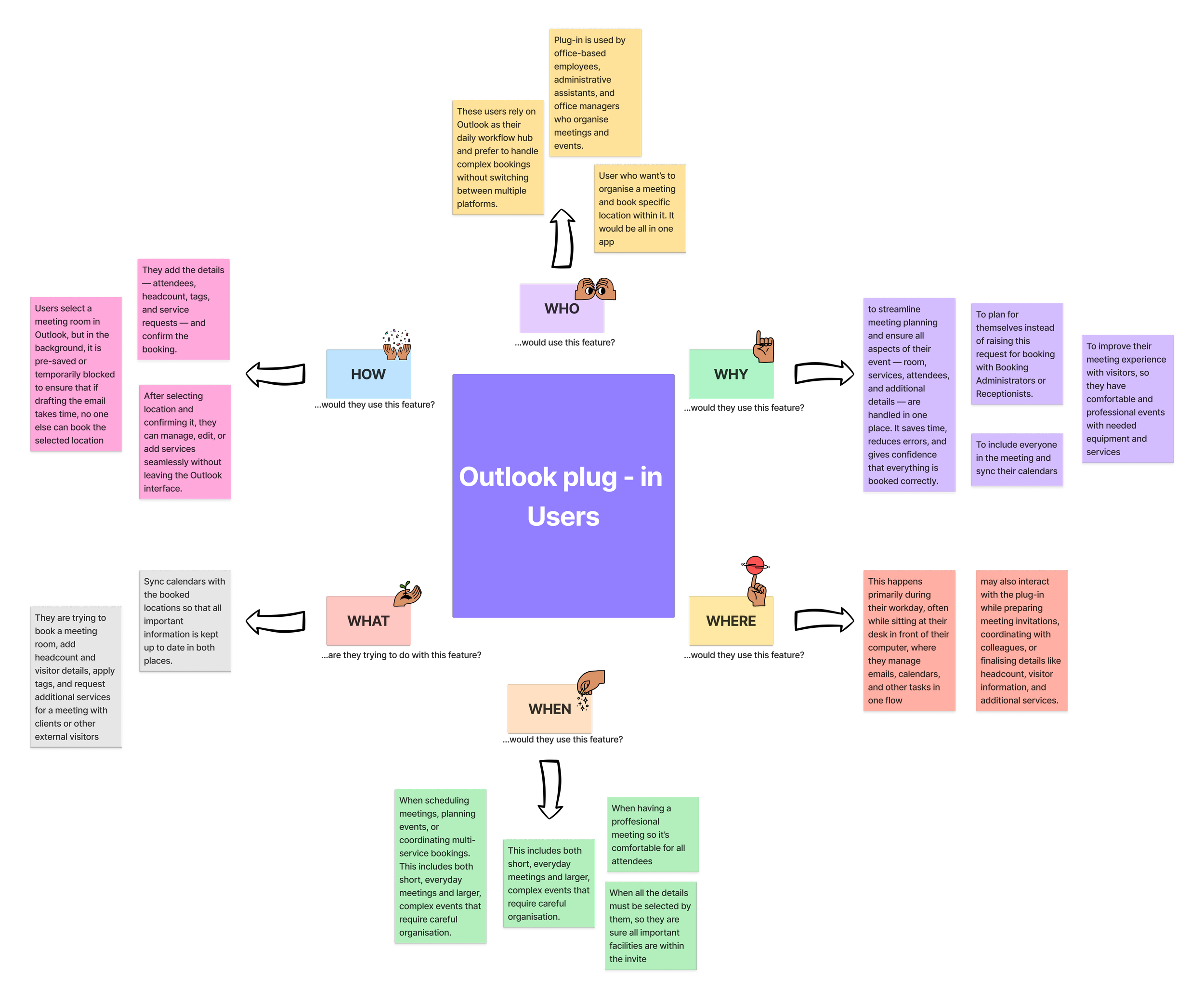
Key findings:
Single-system preference. Users consistently want to manage everything in one place. Context-switching between apps isn't just inconvenient - it actively breaks their workflow.
Desktop is the primary surface. Working primarily at their desks, users gravitate toward web-based interfaces over mobile, making the Outlook plugin a natural fit for their environment.
The plugin is a details layer. Users rely on it not just to book a room, but to enrich that booking: adding visitors, requesting services, and setting the agenda all in one flow.
Rooms must be locked during drafting. Users expect the system to protect their selection while they compose and add details, eliminating the anxiety of losing a room mid-booking.
Status clarity drives confidence. Transparent, real-time indicators for service availability and room status are essential, because ambiguity causes hesitation and erodes trust in the system.
Sync reliability is non-negotiable. Seamless, real-time synchronisation between Outlook - GemEx App - GemEx Platform isn't a nice-to-have - it's the foundation of a dependable experience.
Designs
Working closely with M&G, we defined the MVP scope required to build on the completed creation flow. Our focus was deliberate - prioritising the features that would make the most immediate impact on everyday work, rather than shipping everything at once.
MVP Feature Set
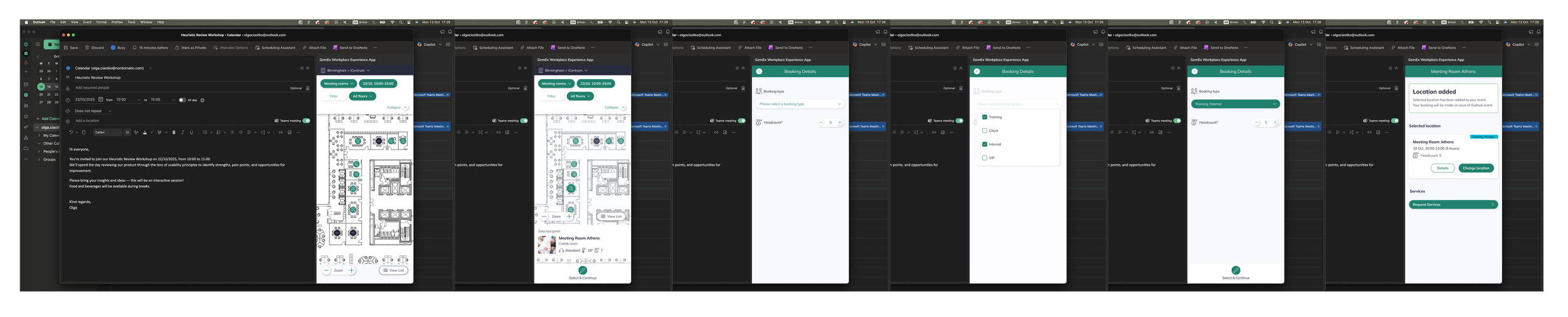
Edit flow with location management. Users can modify bookings at any point without leaving Outlook — swapping rooms, where the new selection is provisionally locked immediately and the original released only on confirmation, or removing a room entirely, cancelling the space reservation while keeping the calendar event intact.
Multi-location booking. For events and workshops spanning more than one space, users can select multiple rooms within a single booking. Each follows the same provisional logic, there's no cap on locations, and full ownership stays with the event organiser - all reservations are attributed to them in GemEx.
Booking type tagging. Users can label bookings by meeting type - internal, client-facing, workshop, and so on — giving Booking Administrators the context to manage spaces appropriately and make informed decisions before making any changes.
Headcount specification. Users can specify how many attendees will be physically present, a meaningful distinction in hybrid meetings. This feeds directly into occupancy monitoring, supporting organisations' in-person capacity and safety policies.
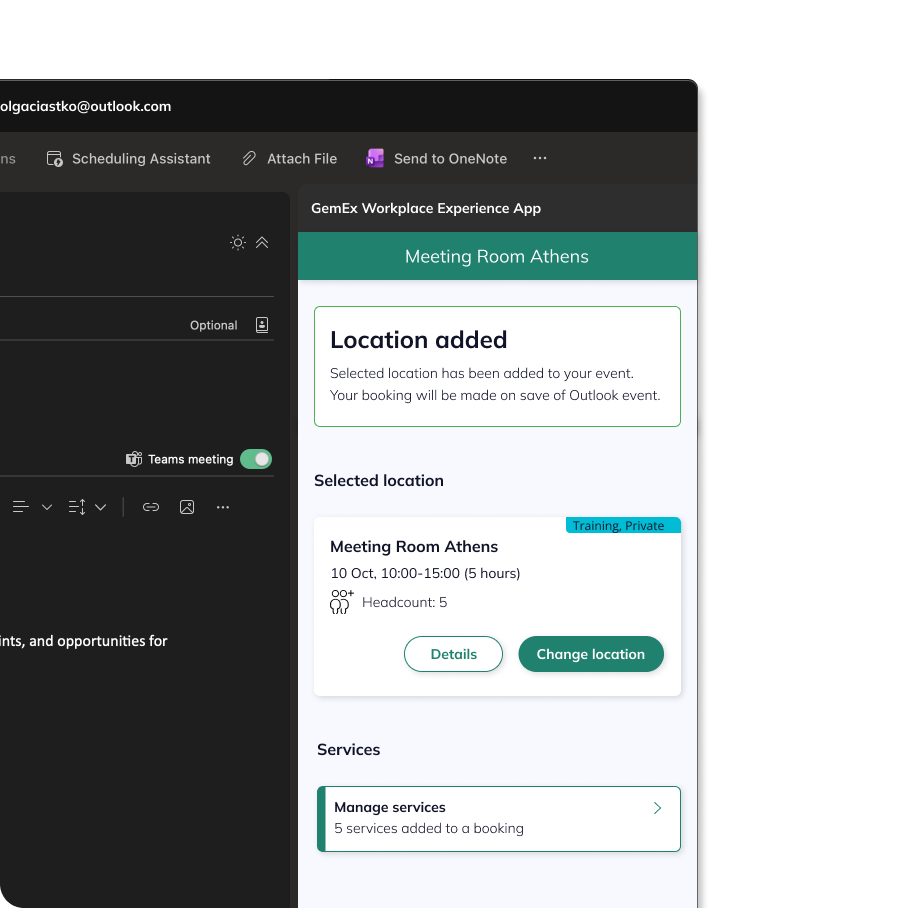
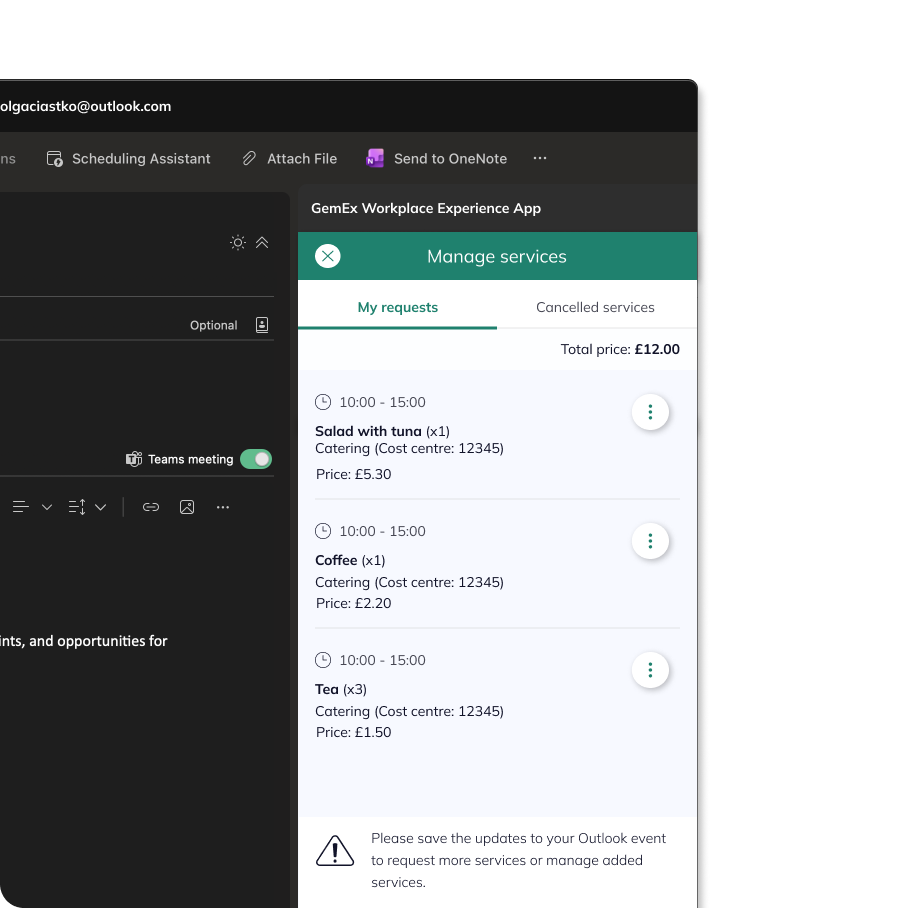
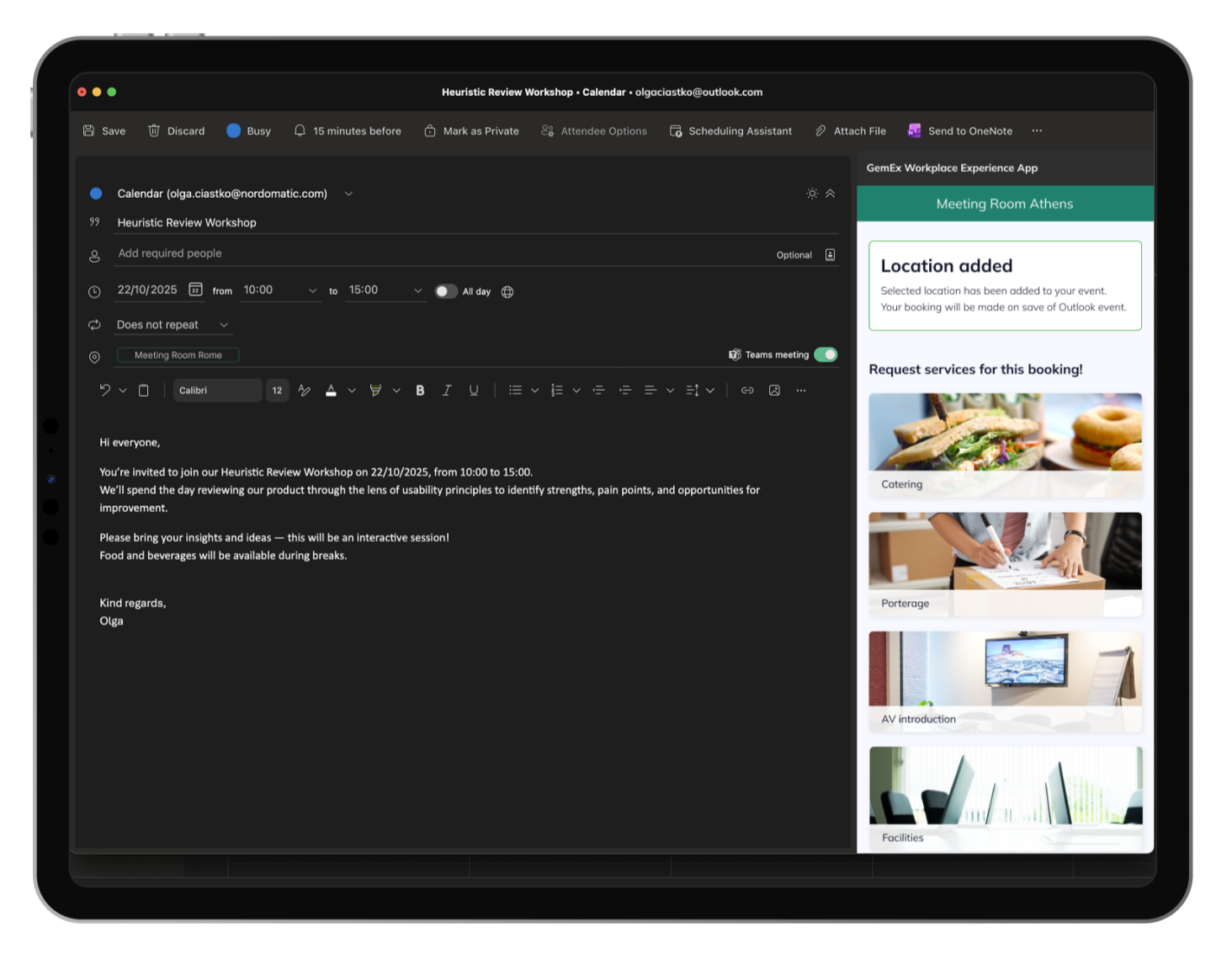
In-plugin service requests. The most complex feature of the MVP - covered in depth in the next section. Services such as catering, porterage, and facilities are requested directly within Outlook and, like rooms, enter a provisional state immediately: held in the background without notifying vendors until the booking is confirmed.
The Hardest Problem - Services
In-Plugin Service Requests
Of all the features in scope, service integration was the most complex - and one I'll explore in full depth in a dedicated case study. Here, I'll focus on what the problem demanded of the design. I came to it with direct ownership: I'd previously designed GemEx's service management infrastructure - the configuration tools used by Booking and Service Admins and had taken the feature through implementation alongside the dev team.
That end-to-end knowledge mattered.
GemEx's Booking Services lets users attach requests (catering, porterage, room layout changes) scoped to specific rooms, floors, or buildings. Each service carries its own rules: cut-off windows, delivery times, cost logic. A layout change needing 30 minutes of prep silently reserves the room from 9:30 for a 10:00 meeting. The user never sees the offset, but it has to work.
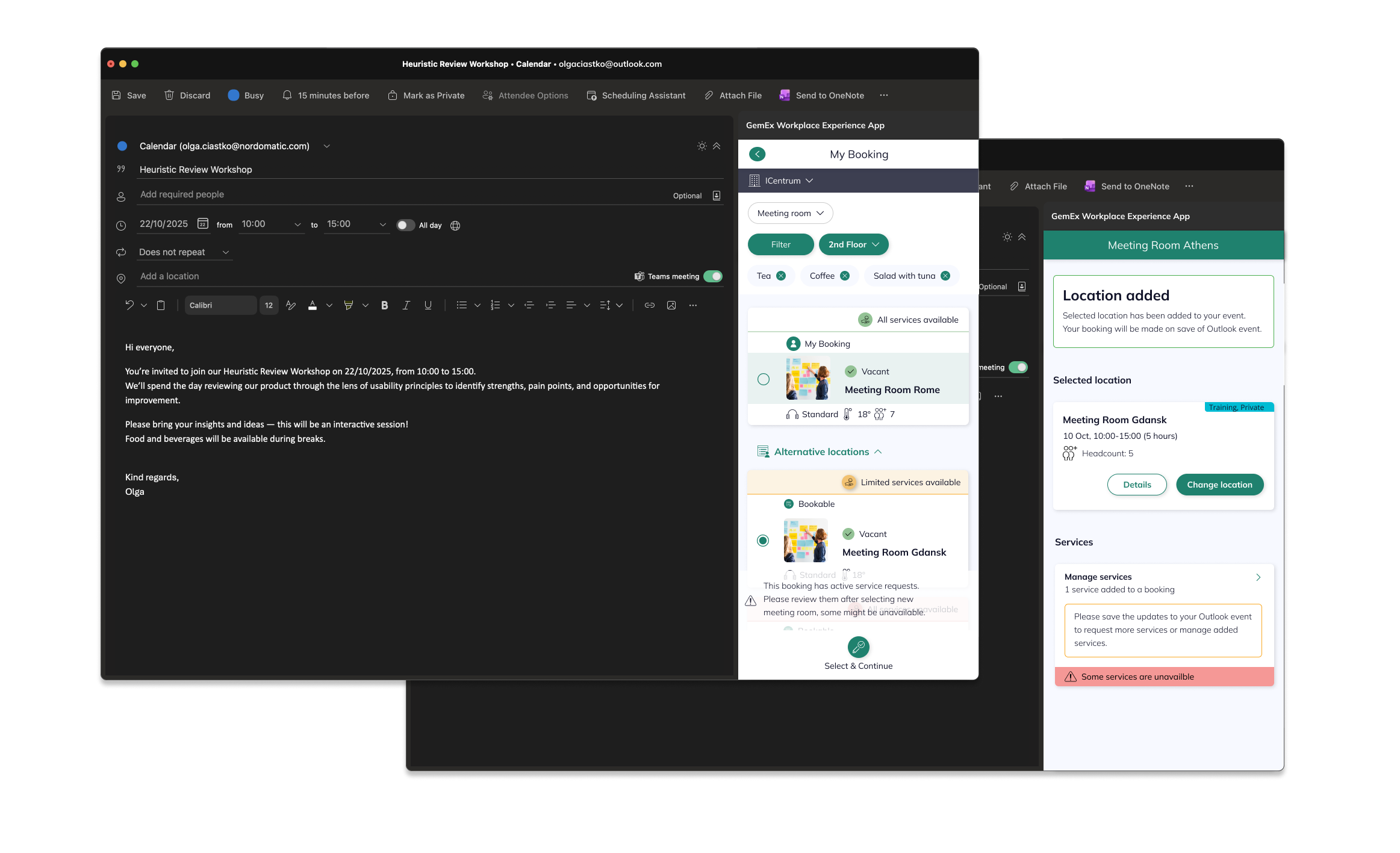
Bringing this into Outlook surfaced a hard sequencing problem: the room must be provisionally locked before any service can be safely attached - a dependency the user should never have to manage themselves. Add Outlook's rigid sidebar constraints and real-time service validation, and every edge case where a service became unavailable had to be communicated clearly, without shaking confidence in the booking.
The Solution Framework
An Iterative Approach
Given the complexity, we adopted a phased delivery model — shipping a functional solution at each stage while continuing to close the gap toward the full app experience.
Phase 1
Redirect via hardcoded link
After saving a booking, users were directed to add services through a deep link into the GemEx web app. It wasn't seamless, and feedback was clear - users found it disruptive. But it unblocked the workflow and gave us real usage data to inform the next iteration.
Phase 3
Creation with in-flow editing
Users could now add and adjust services within the creation journey itself, approaching the fluid, app-like experience we were targeting.
Phase 2
In-plugin service selection (creation only)
We introduced the ability to browse and select services during the booking creation flow, directly within the plugin. Editing services post-booking was still out of scope at this stage, but the experience was meaningfully closer to the app.
Phase 4
Full CRUD
Complete service management within the plugin: create, view, edit, and cancel service requests without leaving Outlook.
Throughout each phase, the design challenge wasn't just feature delivery, but it was communication. Where technical or time constraints meant the experience fell short of the app, the interface had to be transparent about limitations, guide users toward what was possible, and never leave them confused about the state of their booking. Every gap between capability and expectation became a UX problem to solve through clarity.
Designing for the Exception: Multi-Room
Some bookings - large events, workshops - need more than one room. The question was where that capability should live, and I weighed two options:
Option A: make it a part of room selection
Let users tick multiple rooms (checkboxes) during the normal pick-a-room step, so a booking can carry several locations from the outset.
Option B: add another location button
Keep the primary flow exactly as users already knew it, and offer the extra room as a deliberate, secondary action after the first is set.
I chose B, for three reasons that stack: it was simpler to build; more importantly, it didn't disturb the well-known single-room flow the vast majority of bookings use; and multi-room is genuinely an edge case - it's for the occasional large event, not the daily meeting. Option A would have taxed every user, on every booking, to serve a minority of them. B keeps the common path clean and treats the exception as an exception. (Each room still follows the same provisional-hold logic, with ownership attributed to the organiser.)
This is the small kind of decision that defines the experience: protecting the default path is often worth more than the elegance of handling everything in one place.
Value & Business Impact
Adoption at scale
What began as a pilot for M&G's London office - serving 3,200+ users - quickly proved its value. The rollout expanded across additional sites, growing to over 10,000 users, and generated interest from other global enterprise clients, including active discussions around a future deployment with EY.
Operational efficiency
Embedding the full booking experience into Outlook, the platform employees already live in, eliminated the need to context-switch, reduced incomplete bookings, and significantly cut the number of unmanaged visitor records and ghost reservations that had previously fallen through the gaps.
Data integrity
Real-time synchronisation between Outlook calendars, the GemEx platform, and physical room panels ensures booking information stays accurate across every touchpoint. Built-in validation before submission reduces conflicts and keeps calendar events aligned with actual room availability, giving both users and administrators a reliable, single source of truth.
User confidence
By raising the capability of the plugin to match the full GemEx App experience, we gave users a credible alternative to falling back on reception desks or fragmented internal tools, shifting complex booking behaviour into a self-sufficient, digital-first workflow.
Learnings
Mental model consistency
Designing across platforms taught me how easily familiar patterns can break. Users bring expectations from one environment into another - and even small changes can cause friction. Finding the balance between necessary adaptation and maintaining recognisable mental models became a key part of ensuring a smooth, intuitive experience.
Technical restrictions
Early collaboration with developers proved invaluable. What first seemed like limitations often turned into creative constraints that guided better, more realistic design decisions. It reminded me that working closely with engineering isn’t just about feasibility - it’s about co-creating solutions that respect both user needs and technical reality.
Understanding user context
Spending time observing users in their real environment completely changed my perspective. Seeing how they interact with the app - from the moment they enter the building until they leave - revealed subtle pain points that interviews alone couldn’t uncover. It reinforced the importance of context in designing experiences that truly fit into people’s day-to-day work.
Next
The M&G pilot established the plugin as a proven, scalable enterprise solution and expansion is already underway, with growing interest from global clients positioning it as a key offering within the PropTech market.
I contributed until December 2025, shaping the product from its earliest foundations through to scaling. I left it live, trusted by thousands of users daily, and with a clear growth trajectory ahead.