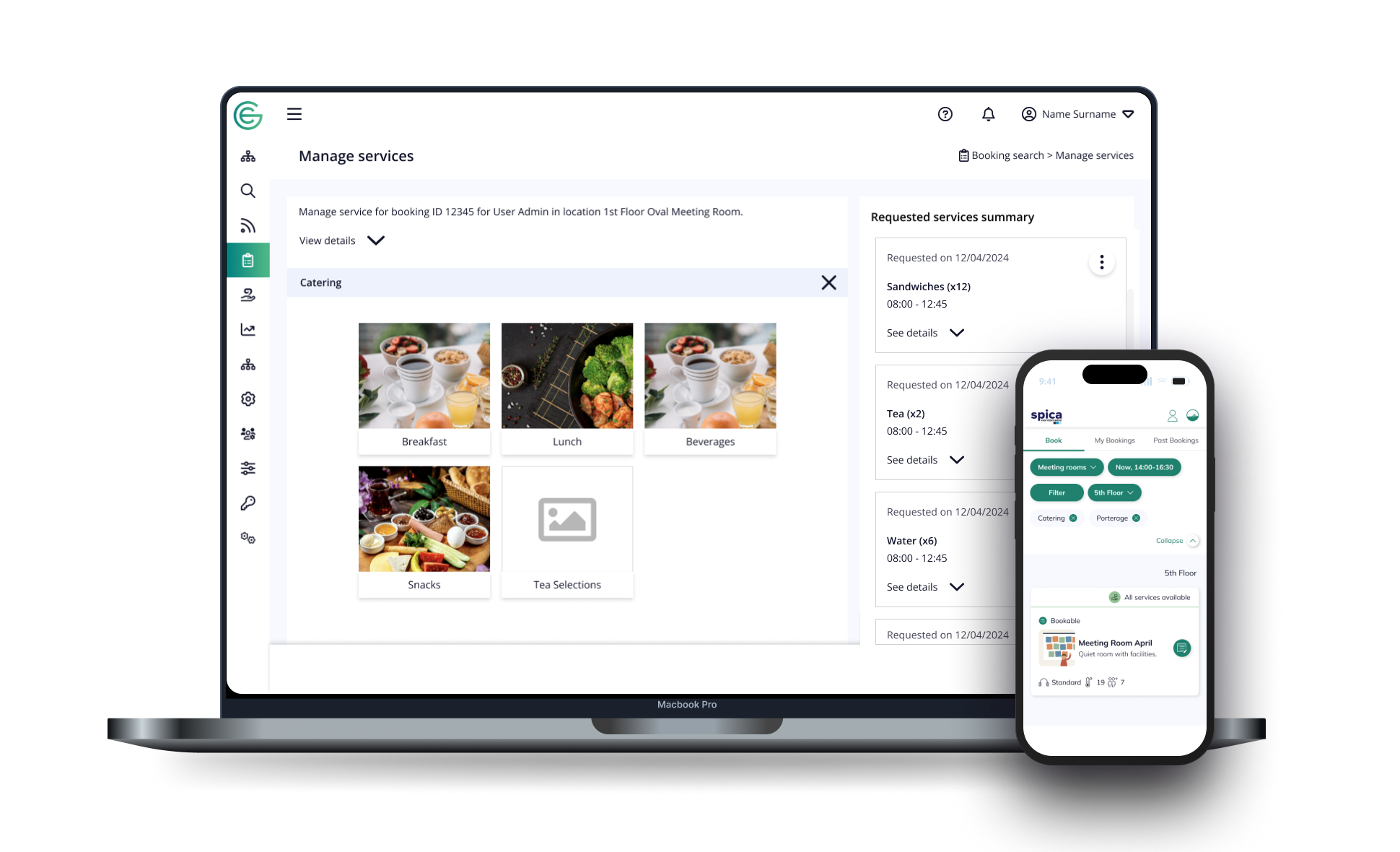
Designing Bookable Services for the workplace
I designed the service layer that moved catering, AV and room-service requests out of the facilities team's inbox and into structured bookings - across admin web, mobile and Outlook.
Timeline
January 2024 - September 2024
February 2025 - July 2025
Client
EY
M&G
Team
2 Product Designers
Product Owner
Developers team
Tools
Figma + FigJam
Lucid
Microsoft Office Outlook
Overview
In one minute
Spica's workplace platform let people book rooms but not the services around them, so catering, AV and layout requests ran on email and phone, untracked and unbilled correctly. I designed Bookable Services end-to-end: a flexible configuration model for facilities teams (unlimited service systems, native or external-API), a requesting flow attached to bookings, the mobile experience and an Outlook entry point. Grounded in field research across major locations, it cut pilot-site facilities email by ~61% and the monthly services billing gap by ~8%.
Booking a room is easy. Booking everything around the room wasn't.
Spica's workplace platform let people book desks, rooms and parking. But the things that make a meeting actually work - coffee for four, a breakfast spread, AV help, porterage - lived in spreadsheets, emails and phone calls to the facilities team. There was no structured way to define those services, no way to request them inside a booking, and nowhere for a facilities manager to manage them at scale.
I designed the Bookable Services layer that closed that gap across the whole product: a configuration system for facilities teams to model their service catalogue, a requesting flow attached to bookings, the in-app experience for end users, and the same capability surfaced in the Outlook plugin where many people actually book their meetings.
PROBLEM
Unstructured & manual
Services were requested ad-hoc over email. No source of truth, no rules, no visibility for the teams fulfilling them.
APPROACH
One model, many surfaces
A single, flexible service hierarchy that powers admin config, web requesting, the mobile app and Outlook alike.
OUTCOME
Self-serve services
Facilities teams configure once; employees add services to any booking in a few taps, with cost, lead time and rules enforced automatically.
My Role
What I owned
I led design across four connected work streams. One of them, the mobile app visual design, was created by another product designer; my job there was to take that design into production and make it work against the real service model.
01
Service structure system
Designed how facilities teams create and model a catalogue of services in the Gemex platform.
03
App adaptation
Implemented and adapted the mobile experience (designed by another PD) to the live service system.
02
Service requesting
Designed how services are requested through Gemex and attached to a booking.
04
Outlook plugin
Brought the services feature into the Outlook add-in where many bookings start.
Discovery
Understanding who services are really for
Before designing anything, I ran a structured discovery using a 7-step and "5 W's + H" methods - mapping who would use bookable services, what they're trying to do, and when, where, why and how. It surfaced a much wider cast than "an employee orders coffee."
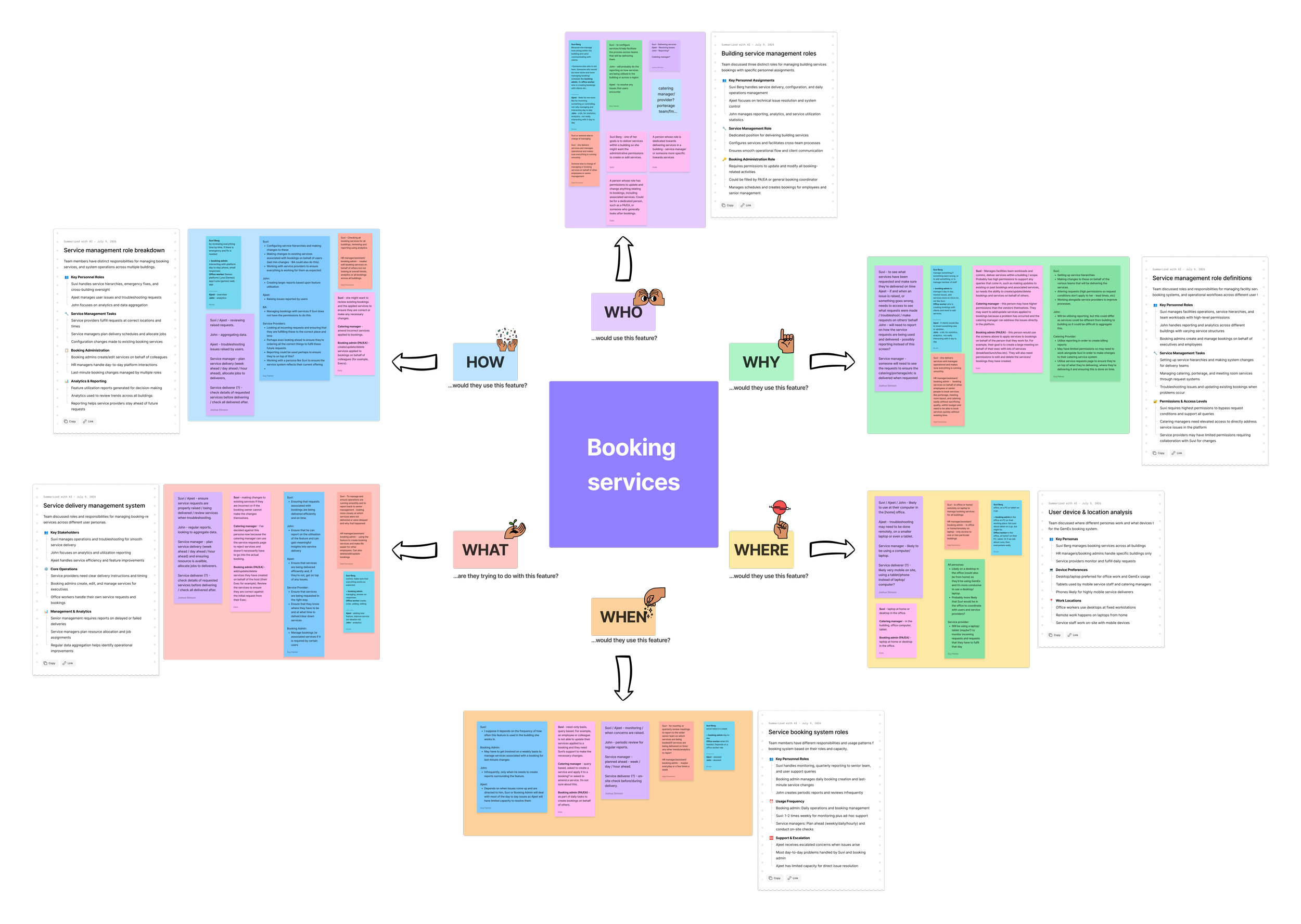
The people this had to serve
The single biggest insight was that this is a multi-sided feature - the person ordering a service is rarely the person fulfilling it, configuring it, or reporting on it. Each needs a different surface, permission level and level of detail.
Facilities / config manager
Sets up service hierarchies, makes changes on behalf of others, needs high permissions and lead-time reporting. The primary user of the configuration system.
Support / troubleshooting
Resolves issues users hit, raises and tracks problems with a service or a booking. Needs visibility into what was requested and its state.
Service manager & deliverers
Plan and deliver catering/porterage week / day / hour ahead; check request details before delivering and confirm afterward - often on mobile, on site.
Analytics / reporting
Aggregates usage across the building - reporting on services is bigger than any single admin page, and informs how the catalogue evolves.
Booking admin (PA/EA)
Creates and updates bookings - and their services - on behalf of colleagues. A power-user pattern the flows had to support, not just self-service.
External vendors / 3rd parties
Some services are delivered by outside providers - the model had to carry vendors and billing alongside internally-delivered services.
The 7-step method turned "build a services feature" into a clear set of jobs across configuration, requesting, fulfilment, support and reporting, which is exactly the shape the four work streams took.
Talking to facilities managers across four cities
To make sure I wasn't designing for one office's habits, I ran calls with facilities managers responsible for services in several locations: New York, Cape Town, Sydney, London and more. Everyone ran services, but how they ran them differed, often shaped by what their current tools happened to allow. Two regional differences changed the design directly.
CAPE TOWN INSIGHT
Layout changes the room's capacity
In Cape Town, managers request a meeting-room layout as part of the booking precisely to set capacity: the same room seats 12 as theatre but only 8 as oval. They request a layout change whenever they need something other than the default.
Elsewhere, a room has one default layout and capacity; requesting a different layout doesn't change the seating count. Same feature, different meaning.
NEW YORK INSIGHT
Menus change every quarter
NYC refreshes its catering menu each quarter. Managers didn't want to delete retired services - they needed to step them out of circulation while keeping the record, so they could see what was offered six months ago and bring it back when it cycles round again.
Deleting would have destroyed history and broken reporting. The need was a reversible off switch, not a bin.
What the research changed
Rather than hard-code one region's assumptions, I designed the model to absorb the differences:
Layout as a first-class, capacity-aware service. Treating room layout as a requestable service (Oval, U-shape, Classroom, Theatre, Informal, Round) means a location that ties capacity to layout, like Cape Town, gets exactly what it needs, while locations with a fixed default simply use it as a preference. The same flow serves both interpretations.
Disable a service from a specific date - a feature I designed off the back of this. In service configuration, a service manager can mark a service unavailable from a chosen date without deleting it. NYC's quarterly menu stays in the system, out of users' view, with its history intact and ready to be switched back on. (This is the "Suspended, from–to" state visible in the configuration screens.)
Designing across four cities was a reminder that "services" isn't one workflow - it's a shared shape with local meaning. The job was a model elastic enough to be true in all four places at once.
Workstream 01: Configuration
A service structure flexible enough for any organisation
The hard design problem wasn't the UI, it was the model. A "service" can be a single item (a bottle of still water) or a deep tree (Catering → Beverages → Coffee Set, with cost, quantity limits and vendors). Facilities teams needed to build either without thinking about data structures.
The information architecture
I worked out a recursive hierarchy: System → Type → Sub-type → Option → Form, where the booking app only ever asks the user to choose at the level that actually branches. The governing rule: if a type or sub-type has children, it can't itself be a selectable option. That keeps the end-user flow short no matter how shallow or deep the catalogue is.
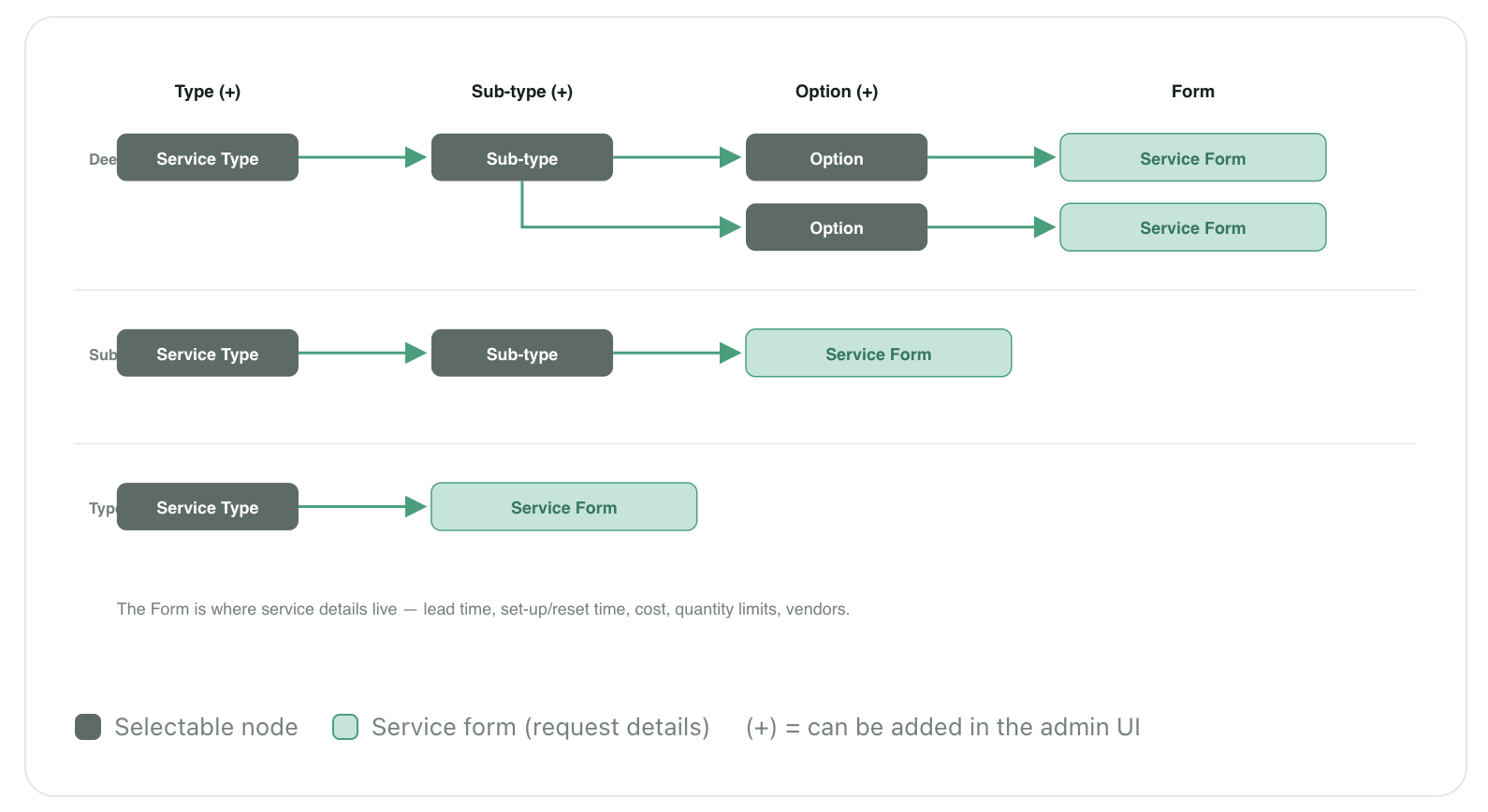
Why it matters: this one rule let the same end-user flow gracefully collapse from four steps to one. A small organisation with a flat list and an enterprise with a deep, vendor-driven catalogue both get an interface that feels right - without us building separate flows.
From raw structure to a usable builder
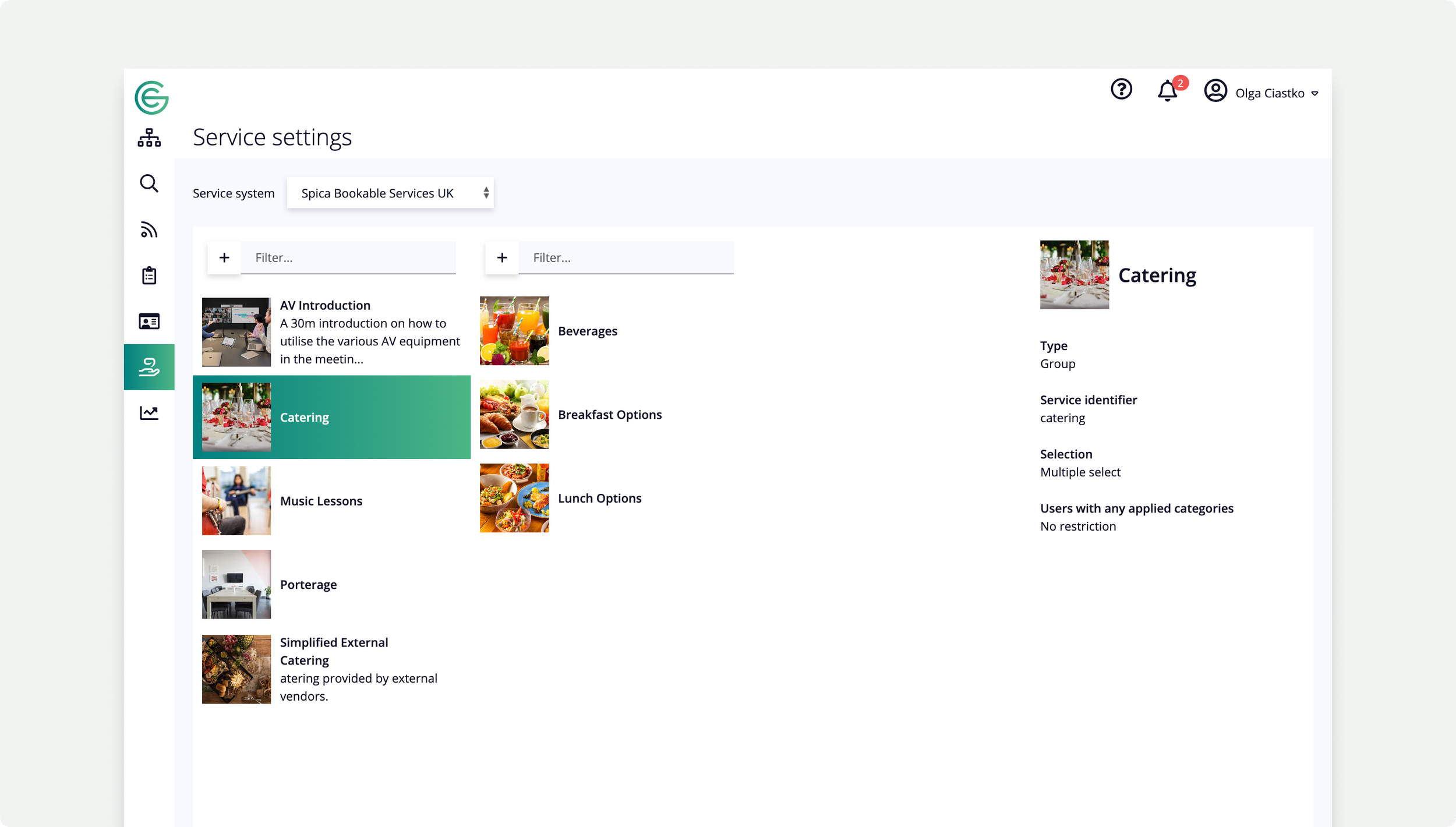
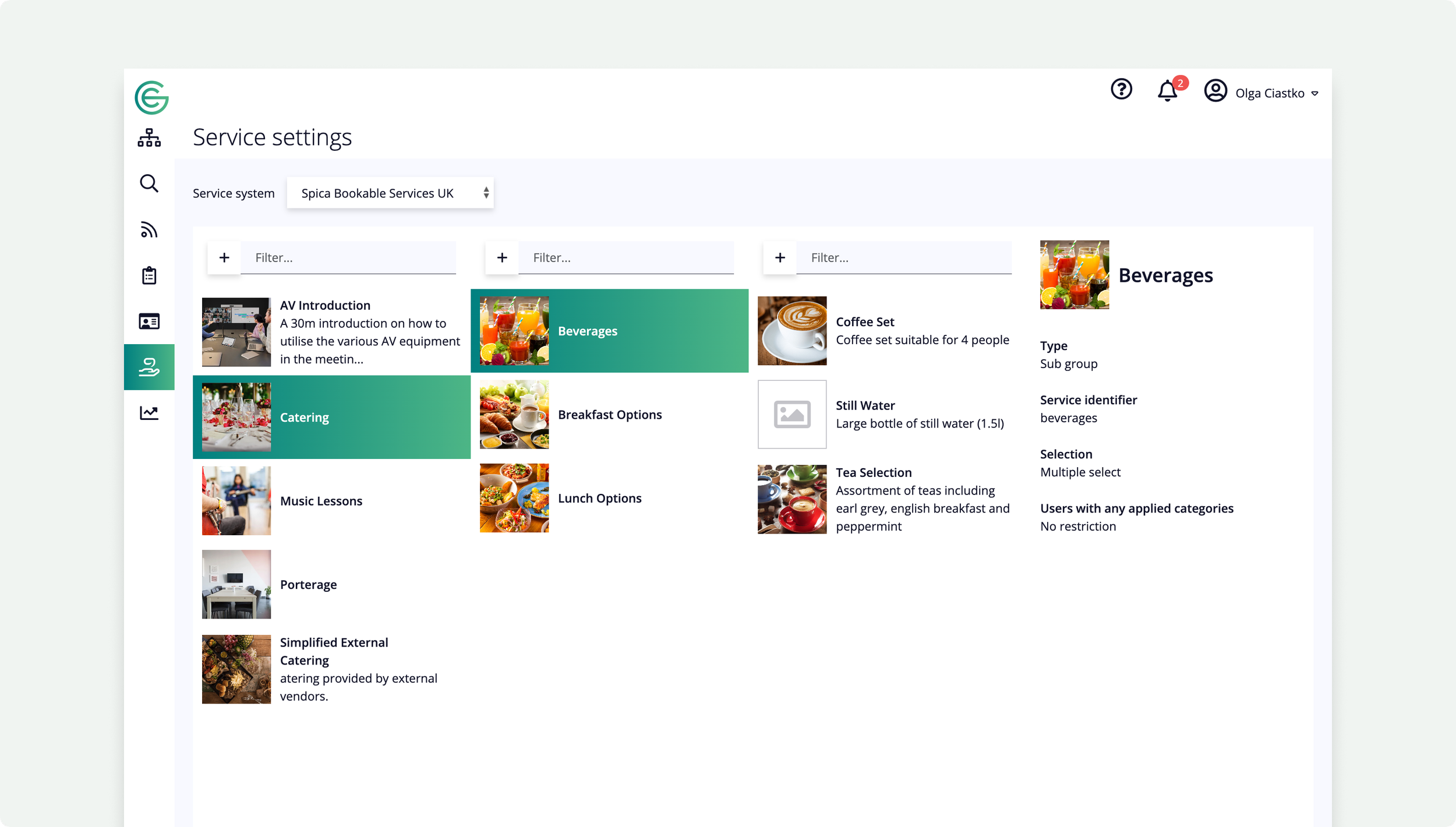
Early concepts exposed the hierarchy as Miller columns - drill from Type to Sub-type to Option, with a details panel on the right. It mapped cleanly to the data, but the blank, all-grey version made it hard to tell where you were or what to do next.
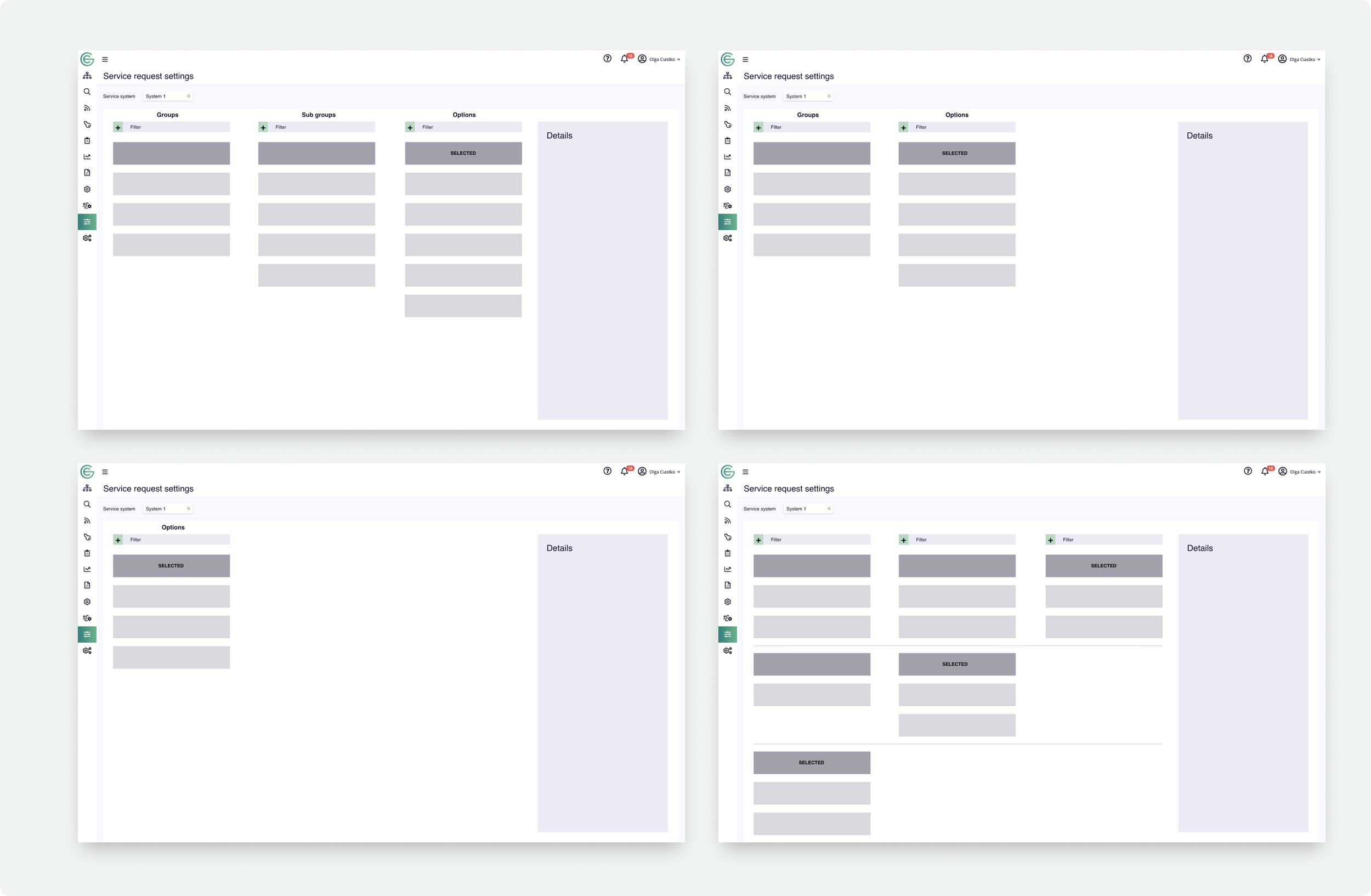
A guided "Create service" flow
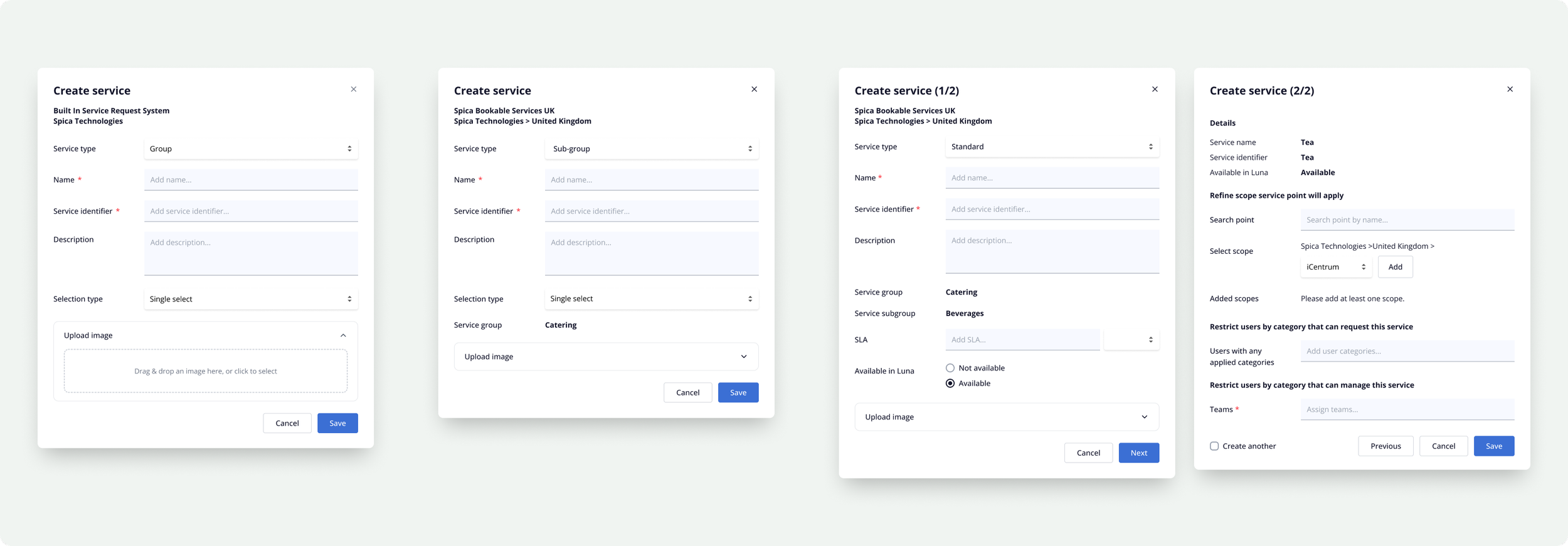
Rather than make people understand the hierarchy abstractly, I turned creation into a short, typed wizard. You pick what kind of thing you're making - a Group, a Sub-group, or a bookable Standard service - and the form adapts. Groups and sub-groups are just organising containers; only Standard services carry the booking details (SLA, availability, cost), so only they ask for them.
The shipped configuration experience
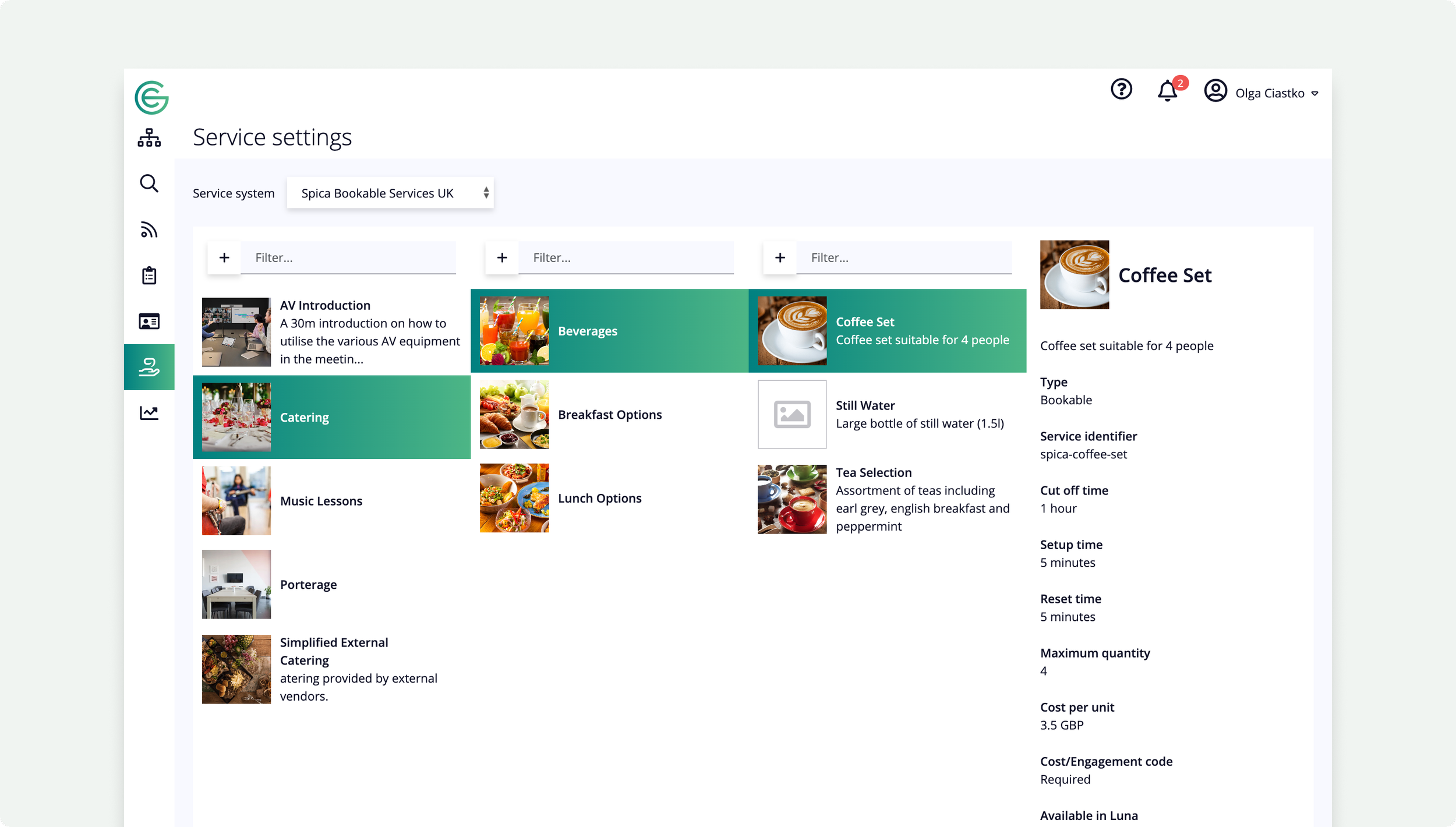
The final "Service settings" screen kept the Miller-column model but gave every node an image, a clear type label, and a rich details panel - so a facilities manager scanning "Catering → Beverages → Coffee Set" instantly sees cost per unit, set-up/reset time, maximum quantity, applicable points, scope and the teams responsible.
Disable, don't delete
Directly from the New York interviews, I added the ability for a service manager to mark a service unavailable from a specific date rather than deleting it. The service drops out of users' view but keeps its full history, so a seasonal or quarterly offering can be switched back on later — visible in the configuration screens as the Suspended (from–to) state. It's a small control that protects reporting continuity and saves teams from rebuilding services they'll need again.
Many service systems behind one simple request
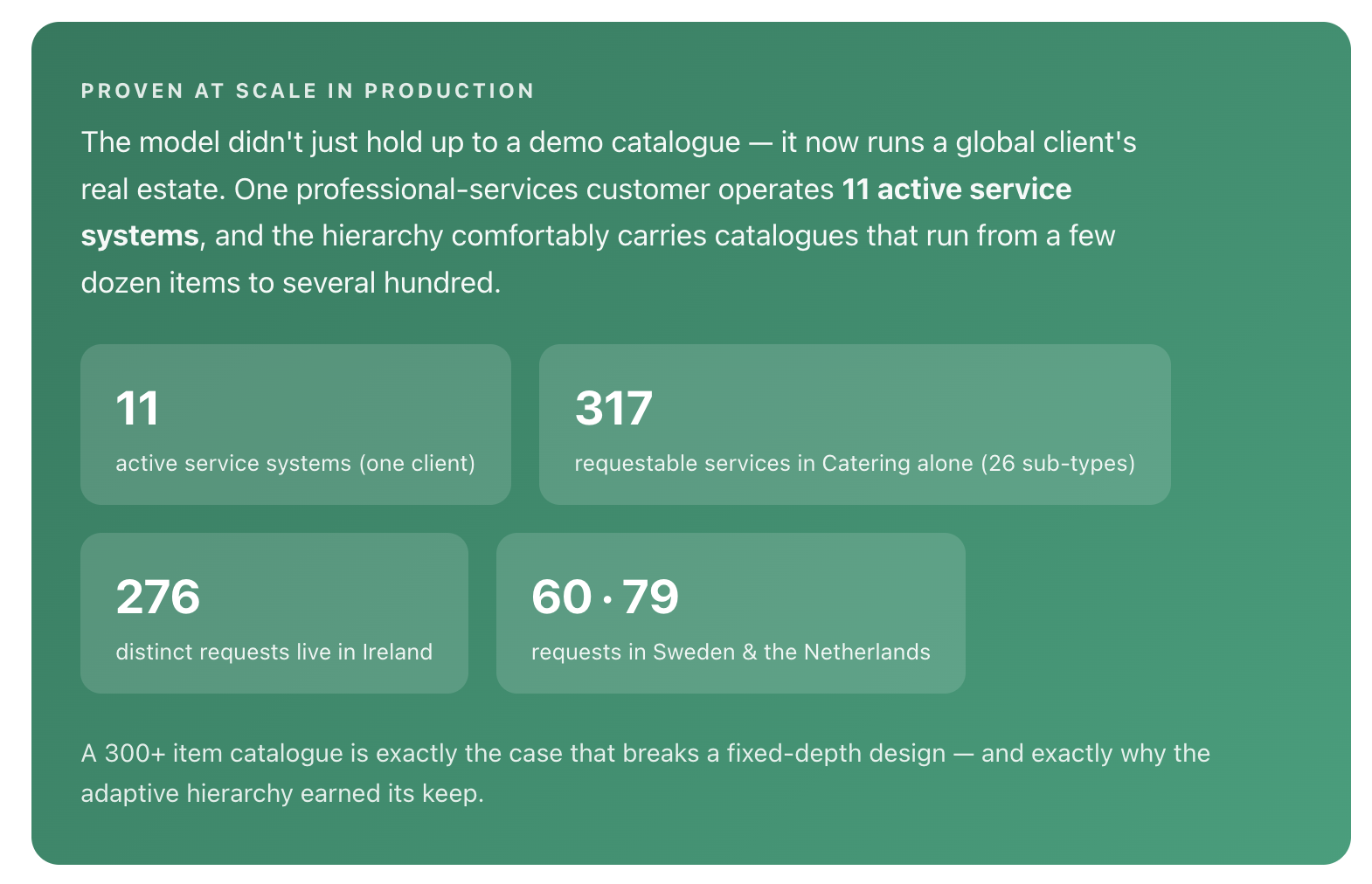
A single organisation rarely has one tidy source of services. So the platform supports multiple service systems, selected from a "Service system" switcher in the admin - and there's no cap on how many a customer creates. Each system can be built natively in Gemex or connected to an external system via API, so existing catering, FM or vendor platforms plug in alongside ones built from scratch.
Admins see the full picture. A service administrator gets an overview of the structure for each system and can move between them.
Native or external, same shape. Whether a system is created in Gemex or wired to an API, it surfaces through the same hierarchy and request flow.
No artificial limits. Customers create as many systems as their estate, regions or vendors require.
The end user in the app or on the web has no idea any of this structure exists. They just request a coffee or a layout - all the systems, APIs and hierarchy stay backstage.
That hidden-complexity split was a deliberate design stance: configuration can be as complex as the business needs; requesting must stay trivial. The admin absorbs the structure so the requester never has to.
Routing every service to the team that delivers it
Configuration isn't only about what a service is - it's about who's responsible for it. When building the structure, the administrator tags each service with a responsible team (catering services to the catering providers, porterage to the porters, and so on). That tag does real work downstream: as soon as a service is created, the dedicated team gets their own page listing the services they own, so fulfilment teams see exactly what they're on the hook for without wading through the whole catalogue.
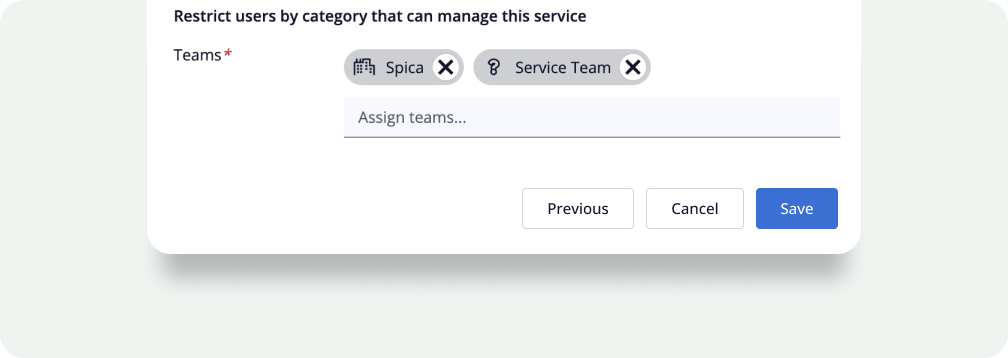
This closes the loop from config to fulfilment: the same tag that organises the catalogue for admins becomes the filter that gives each delivery team a clean, relevant work list.
Workstream 02:
Requesting
Turning the catalogue into a request
Configuration is only valuable if requesting is effortless. The second system I designed lets a service, with all its rules, be attached to a booking through Gemex, so the catalogue a facilities team builds becomes something an employee can actually order.
Design principles for requesting
Rules travel with the service. Lead time, cut-off, max quantity, cost and cancellation windows are defined once in config and enforced automatically at request time.
Request in the context of the booking, never as a separate errand - services hang off the room and time you've already chosen.
Selection type is honoured - single vs. multiple select flows straight from the group's configuration.
Cost & engagement codes surface before confirmation, so there are no billing surprises for the facilities team.
The same service definition powers admin config, the web request, the mobile app and Outlook. Build it once; it behaves consistently everywhere a person can book.
Because requesting reads directly from the structure, anything a facilities team changes - a new vendor, a suspended item, a price change - is reflected at the point of request immediately, with no second system to maintain.
The add & edit flow - with validation built in
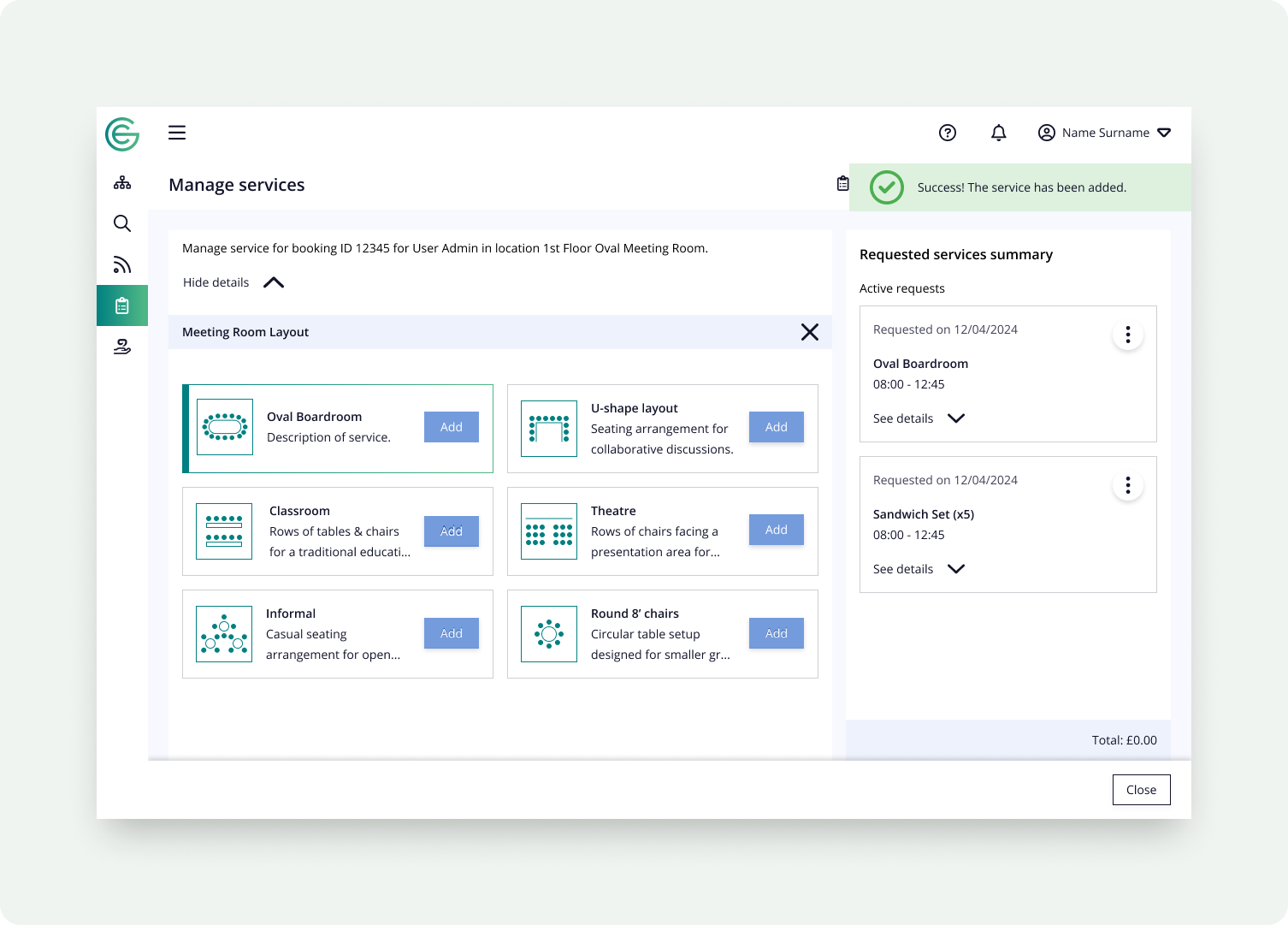
I mapped the full journey for adding a service to a booking and editing one later, designing the validation as part of the flow rather than an afterthought. The system shows all possible services but only allows selection of valid ones; invalid choices are highlighted and removed before a request can be confirmed.
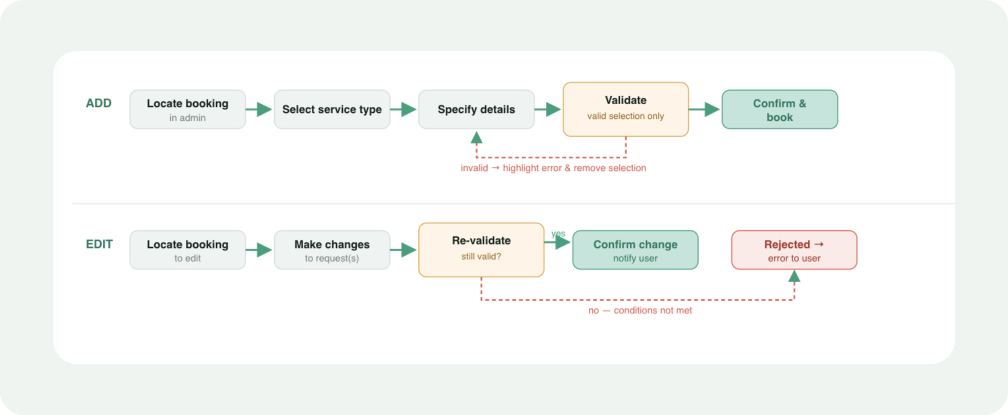
A known constraint I designed around: at this stage you could add one service type at a time within a booking. Surfacing that limit clearly - rather than letting people assume multi-type batch adds worked - kept the flow honest and predictable.
Exploring the layout: how deep should the hierarchy go?
The requesting screen lives inside a booking, so a facilities admin reaches it from Bookings search → ⋮ → Manage services. The open question was how many levels of drill-down it should impose. Catering naturally wants three (Group → Sub-group → Option); a room layout only needs one. So I prototyped the same flow at three depths and tested which felt right.

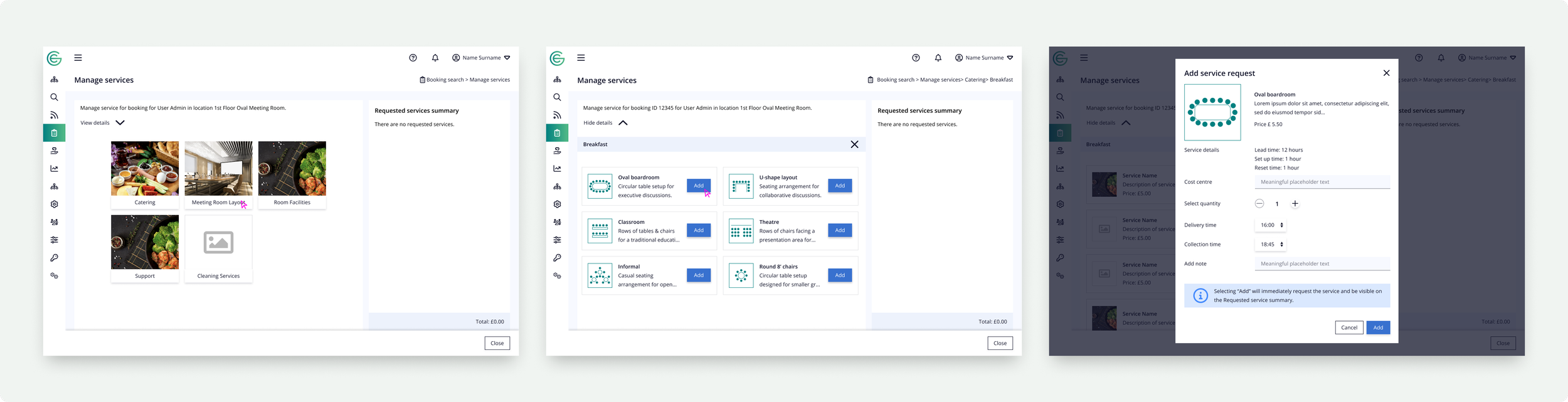
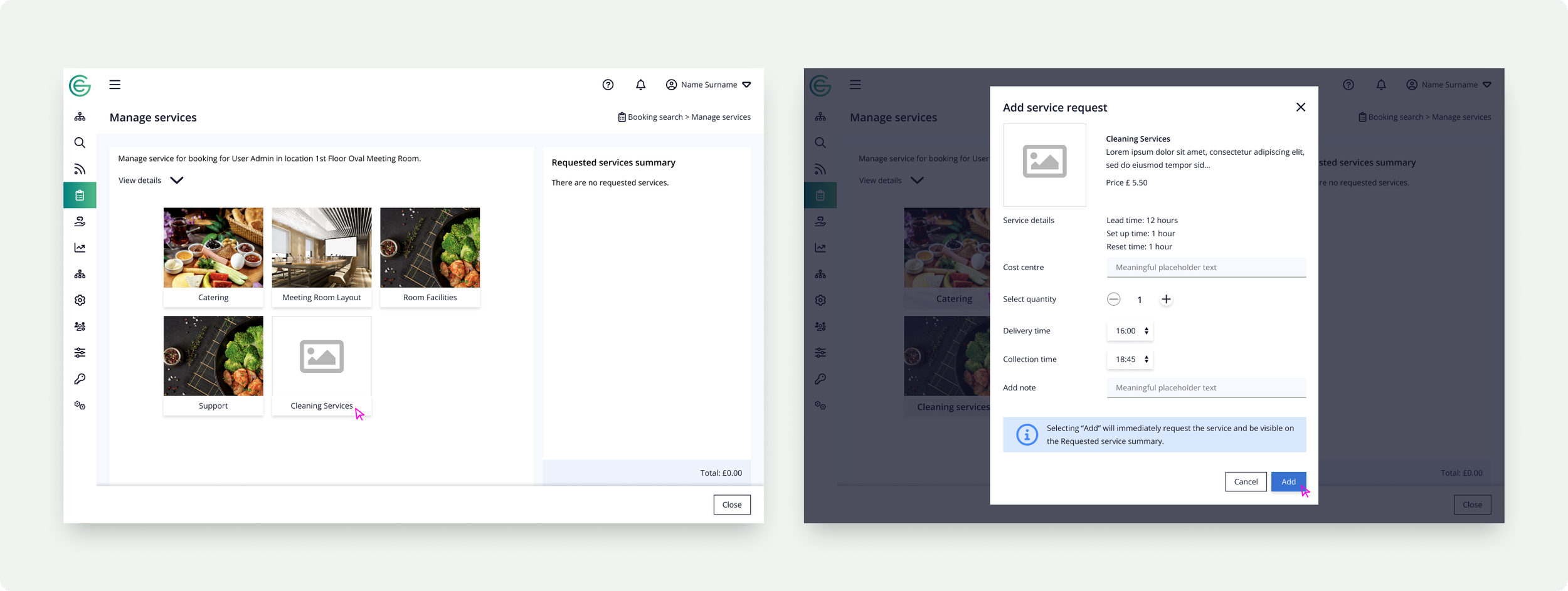
1-LEVEL
Flat list / direct add
Fastest for trivial cases, but collapses under any real catalogue. Right only for the simplest services.
2-LEVEL
Group → Option
A balance -enough grouping to stay organised, short enough to feel quick. Worked well for layouts and simple catering.
3-LEVEL
Group → Sub-group → Option
Most expressive, but every service - even a one-off - pays the cost of two extra clicks. Overkill for shallow catalogues.
The conclusion wasn't "pick one depth" - it was to let the structure decide. The flow renders only the levels a given service actually has, so depth follows the catalogue instead of being fixed. The same insight as the configuration model, proven from the requesting side.
Designing the request modal and its states
Selecting a service opens an "Add service request" modal carrying everything the service definition specifies - lead/set-up/reset time, price, cost centre, quantity, delivery and collection times, and a note field - with a clear message that adding immediately requests the service. The work that made it production-ready was the full set of states.
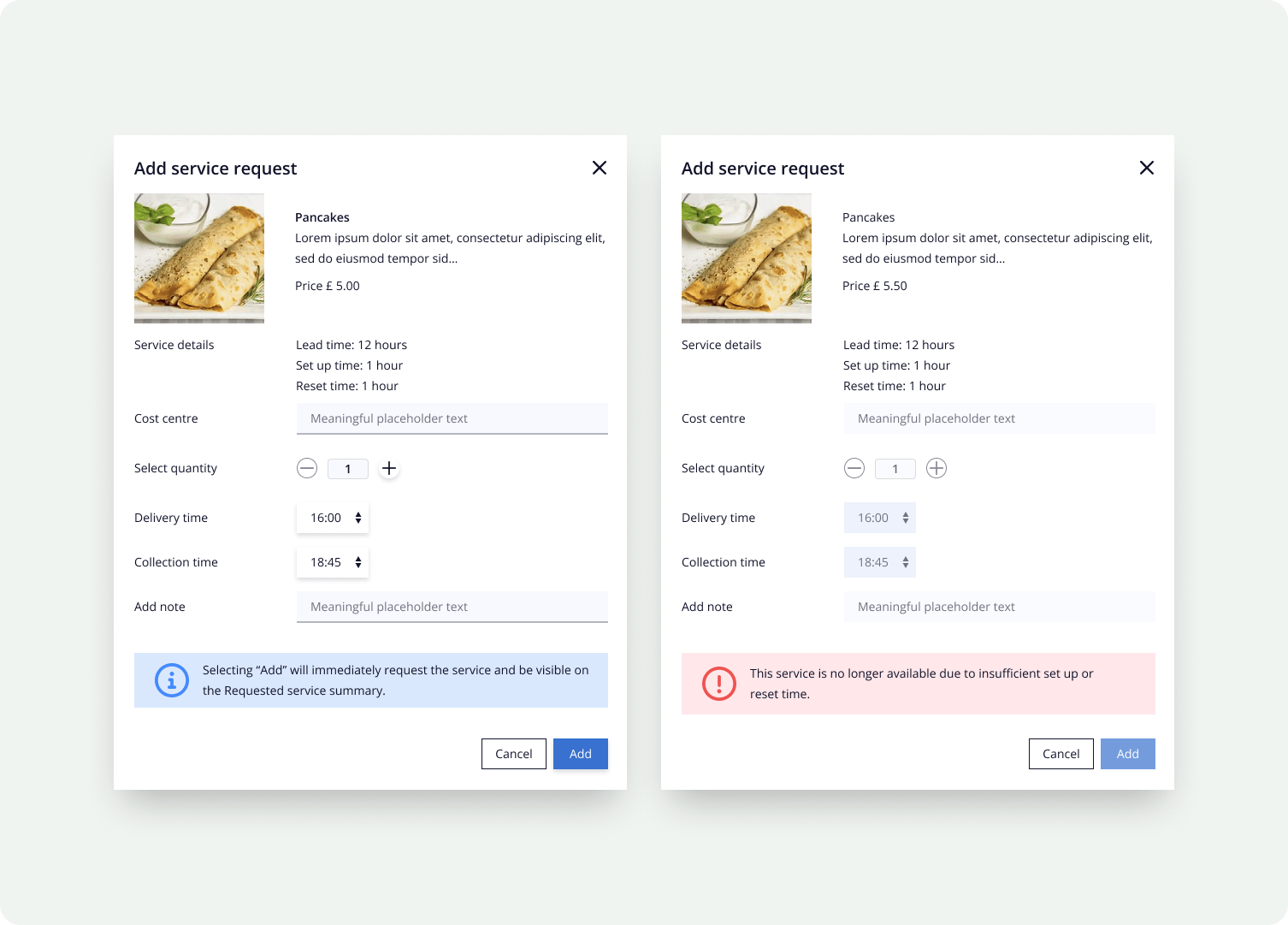
A consistent decision across the feature: when a service can't be requested, the UI shows it and explains why (insufficient set-up/reset time) rather than silently hiding it - the same "design the unhappy path" principle that drove the app's partial-availability states.
The hard part: cancellations & notifications
The least glamorous but most important system was what happens when a booking changes. Cancel a booking, move its time, or edit it through booking admin, and every linked service request has to respond correctly and the right people have to be told. I mapped the logic for partial vs. full cancellation, individual vs. multiple service changes, and edits made directly vs. via a booking change.
🟠 Every change asks two questions: is it linked to a booking, and does its nature actually require a notification? Only then is an activity created and pushed to the notification queue.
🟠 Past bookings short-circuit. No point notifying a vendor about a service for a meeting that already happened - the flow ends early.
🟠 Grouped notifications. Multiple service changes from one booking edit are batched so a vendor gets one coherent message, not a burst of fragments.
🟠 Configurable behaviour. Whether a service can be moved/updated vs. must be cancelled is driven by config, so the rule can evolve without redesigning the flow.
Closing the billing gap: services on past bookings
A problem only visible once the feature was live: a lot of services were still arranged offline in the moment -"can you bring a few more sandwiches?", "add another round of coffee." Those extras never made it into the system, so they never hit the right cost centre. Every company team has a service budget, and at month-end the recorded services didn't reconcile with the supplier bills. Finance was left chasing the difference.
The fix was deliberately un-flashy: let admins add services to past bookings. It runs against the grain of the cancellation logic, which normally treats a past booking as closed, but it gives facilities and finance a way to record what actually happened, attribute it to the right team's budget, and make the numbers tie out.
Why it mattered
Accurate cost attribution. Late and offline extras finally land against the correct team's service spend.
Reconciliation, not guesswork. Recorded services match supplier invoices at month-end, so finance isn't reverse-engineering the gap.
One source of truth. The booking record reflects reality, including everything added after the meeting started.
Workstream 03:
Mobile app
Bringing services into the Gemex app
The mobile visual design was created by another product designer. My role was to adapt and implement it against the live service model - resolving the gaps between a polished concept and the real states, rules and edge cases the service system produces.
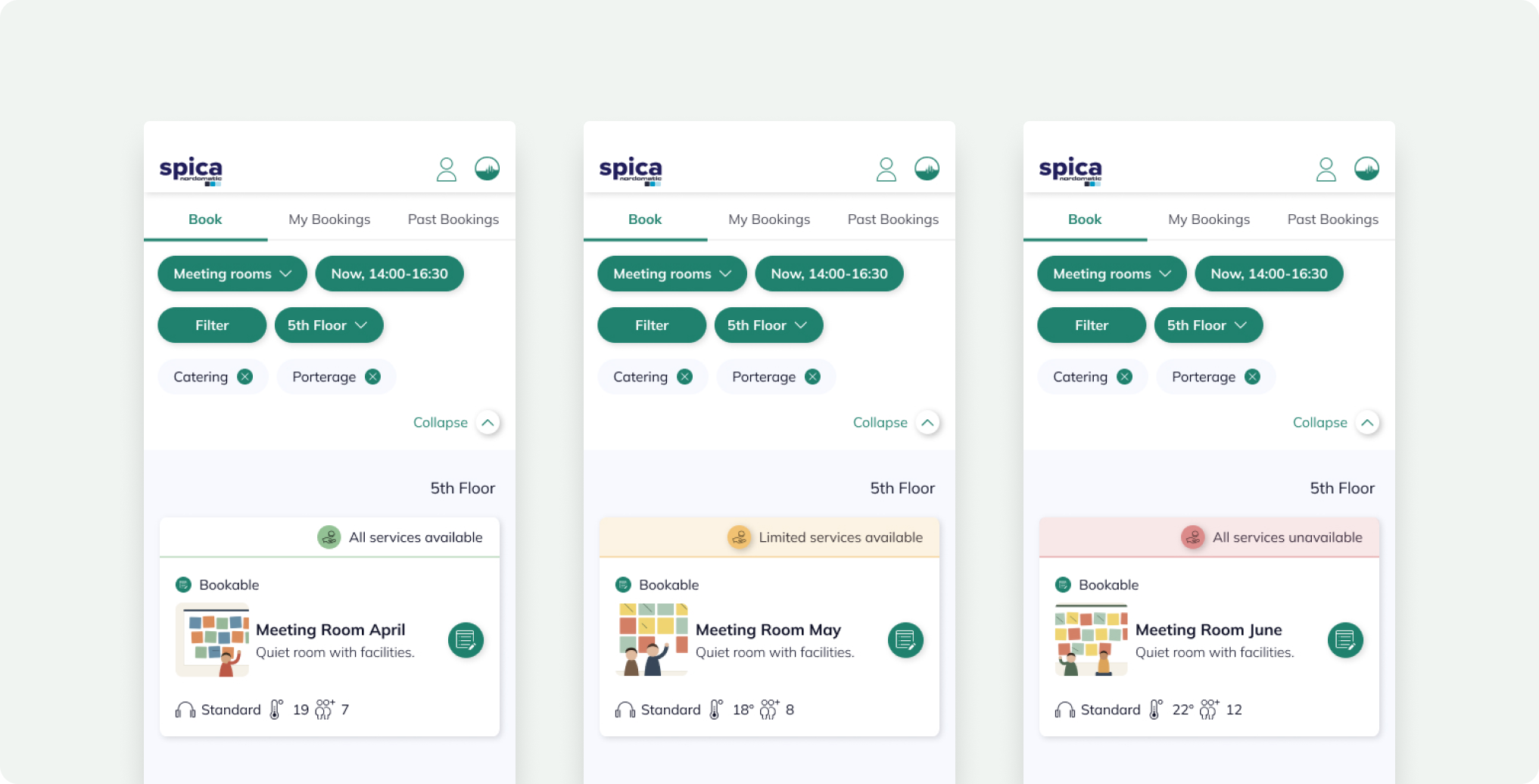
Filtering rooms by the services they offer
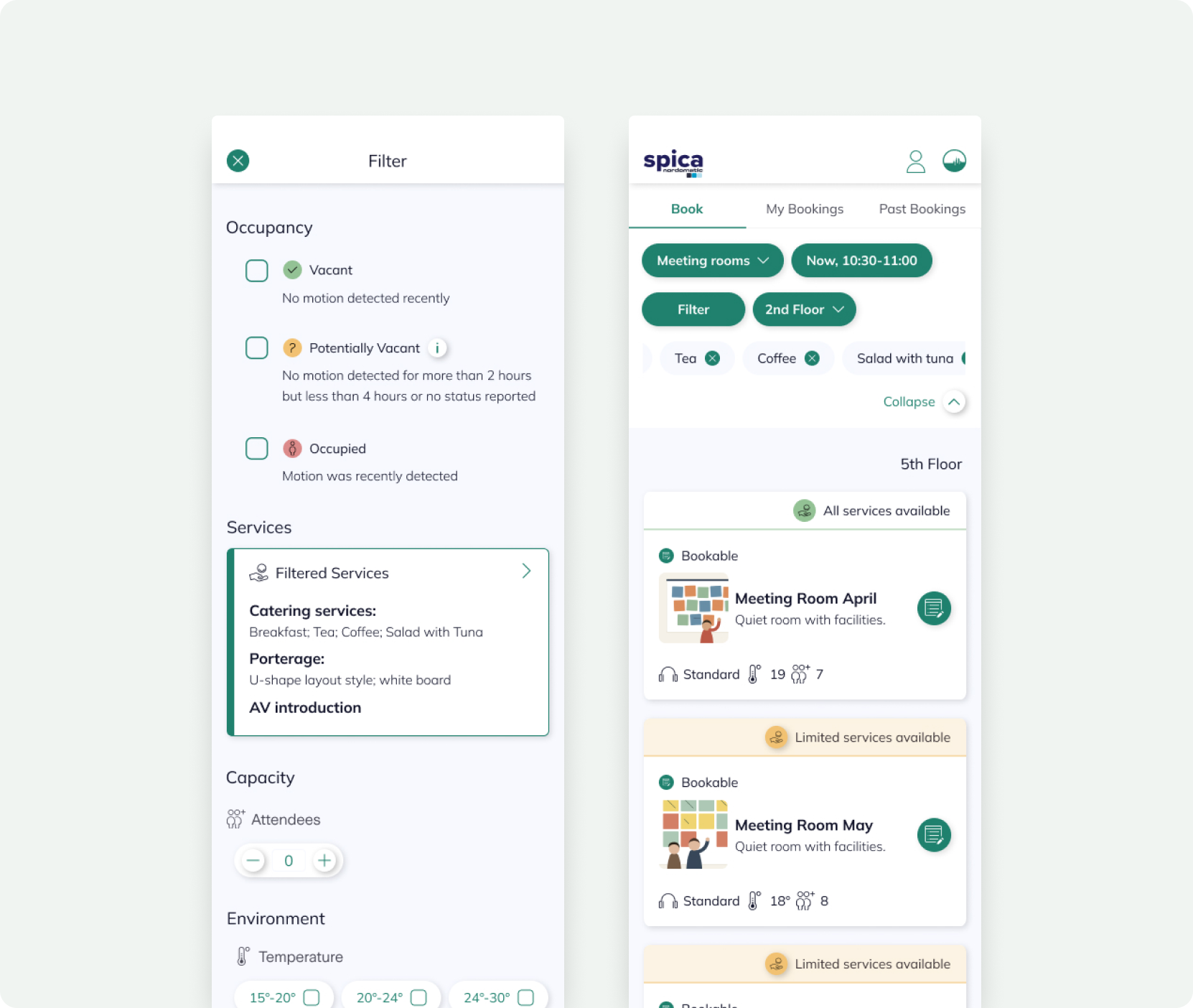
Services became a first-class filter in the booking flow. Someone can filter to rooms that can actually deliver what they need "a room with catering, tea, coffee and a tuna salad" - instead of booking blind and chasing facilities afterward.
The state I had to design for: partial availability
The interesting implementation problem was that a room rarely matches a multi-service request perfectly. I needed a clear three-state model so people understand why a room is or isn't a good fit and get useful alternatives instead of a dead end.
All services available
The room can deliver everything requested. Book with confidence.
Limited services available
Some requested services can't be delivered here - shown explicitly so the trade-off is a choice, not a surprise.
All services unavailable
None are available; the app surfaces alternative rooms that can meet the request.
Ordering a service end-to-end
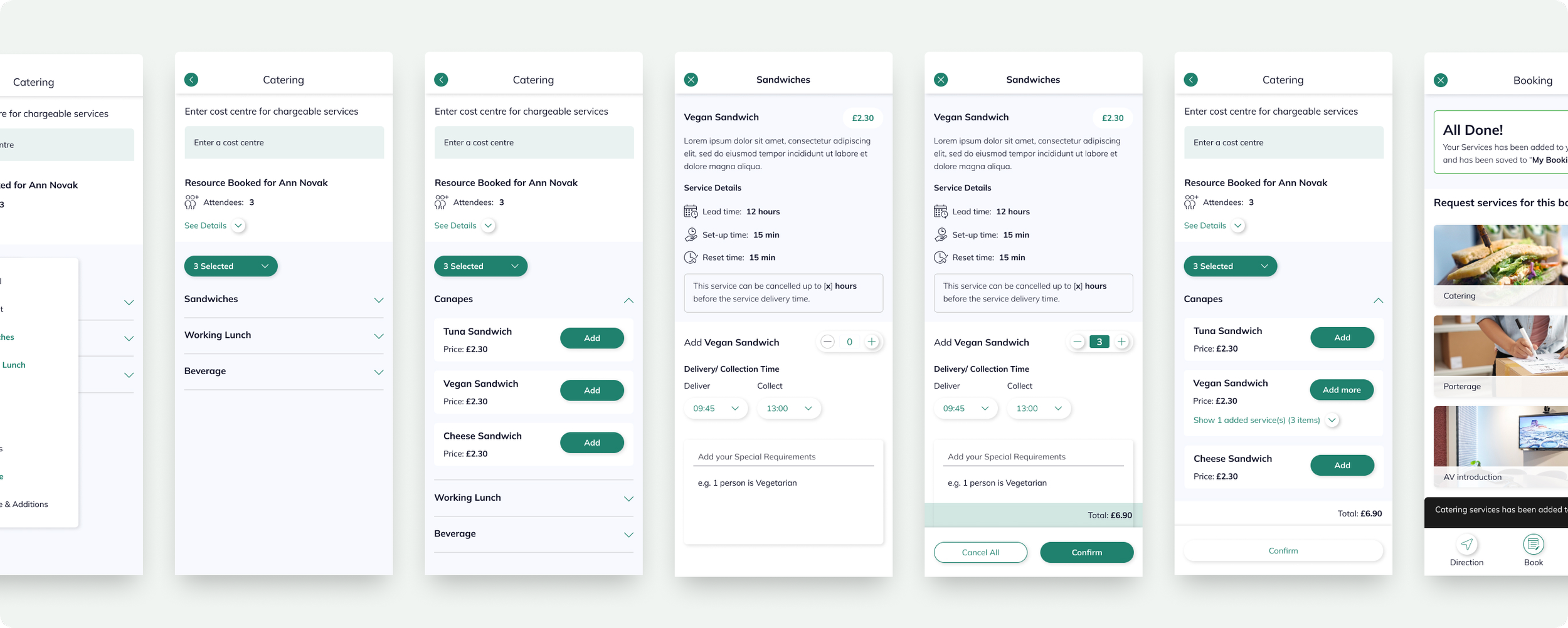
For a bookable item like canapés, the detail screen had to carry everything the service definition specified: lead time, set-up and reset time, the cancellation window, per-unit price, and turn it into a simple order: pick a quantity, set delivery and collection times, add special requirements (allergies, dietary needs), see a running total, confirm.
Adaptation, not just hand-off.
Taking another designer's concept to production meant reconciling it with reality: empty and partial states, services with no image, single vs. multiple select, cut-off times that disable a service mid-flow, and totals that update as rules apply. That reconciliation work is where the feature became shippable.
Workstream 04:
Outlook Plugin
Meeting people where they already book - Outlook
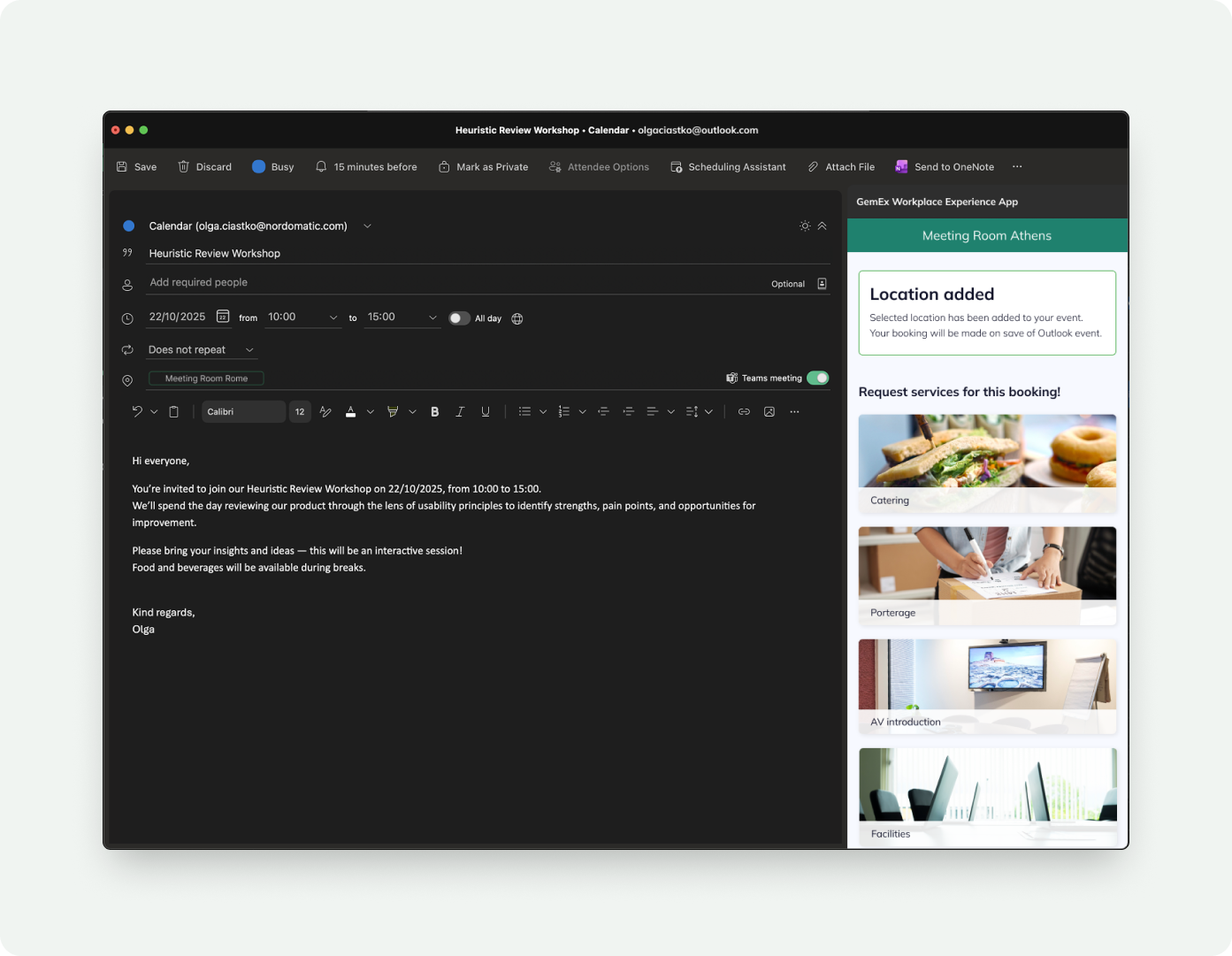
A large share of room bookings never touch a standalone app, they happen while someone is setting up a meeting invite. So I brought Bookable Services into the Outlook add-in, letting people add catering and services to a room as they schedule, without leaving their calendar.
The constraint shaped the design
A tiny canvas. The Outlook task-pane is narrow and tall - the rich, multi-column admin model had to compress into a single, linear, scannable flow.
Reuse the model, rethink the layout. Same service structure, rules and states as the app - re-expressed for a constrained, productivity-context surface.
Zero context-switching. Service selection, lead-time warnings and cost all resolve inside the invite the person is already creating.
The goal wasn't to port a screen, it was to make the same service capability feel native in three very different environments.
Design Decisions
What held it together: design decisions I’d defend
Model first, UI second
Getting the hierarchy and the "no children → selectable" rule right meant every downstream surface could stay simple. The data model was the UX decision.
Make the rules do the work
Lead times, cut-offs, quantities and costs are enforced by config, not by people remembering policy. Fewer errors, less back-and-forth.
Complexity backstage
Unlimited service systems, native or external-API, tagged by responsible team - all invisible to the person requesting. Admins carry the structure so requesters never see it.
One definition, four surfaces
Admin, web, mobile and Outlook all read the same service structure - consistent behaviour and a single place to change anything.
Design the unhappy paths
Partial availability, suspended services, missing images and alternatives got as much attention as the perfect case - that's what made it production-ready.
Validation
Testing the configuration with real admins
The service-structure system was the riskiest piece - if facilities admins couldn't model their catalogue, nothing downstream mattered. So I ran moderated usability testing of the Service Configuration on the live GemEx platform, giving participants realistic building-management tasks and measuring how it actually felt to do them.
Task 01
Build a catering catalogue
Create a service structure for Catering with Breakfast, Lunch and Beverages - each with options - available to Gemex app users booking meeting rooms in a building.
Task 02
Scoped, conditional services
Create a room-layout service for all medium and large rooms in a building except the ground floor - testing how well scope & exceptions could be expressed.
Task 03
An issue-raising service
Create a service letting users raise an issue with the water machine across all tea points - testing the non-catering, request-type end of the model.
How I measured it
After each task, participants rated difficulty, satisfaction and confidence on a 1–7 scale, followed by open questions: does the configuration let you set up what you need, is the service settings page clear, which parts are most and least valuable, and what would you change? I also captured baseline GemEx familiarity so scores could be read in context.
What the tasks probed
🔸 Whether the hierarchy was learnable without explanation.
🔸 Whether scope and exceptions (e.g. "except ground floor") were expressible.
🔸 Whether the same model stretched from catering to issue-reporting.
🔸 Which details in the settings panel earned their place.
Why it mattered
Testing on the real platform with genuine facilities tasks meant findings fed straight back into the shipped "Service settings" design - the clearer node labels, imagery and richer details panel came directly from watching admins try to orient themselves.
Impact
Outcomes
A capability that didn't exist before now spans the whole product, and at the pilot site it moved real operational numbers, not just sentiment.
−61%
weekly service emails to facilities at the pilot site (820 → 320) as requests became structured bookings.
~8%
lower monthly gap between recorded services and actual supplier bills, after enabling services on past bookings.
Service requests moved out of the inbox
In the first months of the pilot, the facilities team's weekly service-related email dropped from 820 to 470, then to 320 - roughly a 61% reduction - as requests shifted into structured, trackable bookings instead of ad-hoc messages.
4
surfaces unified on one service model - admin web, web services requesting, Luna app and Outlook.
What I'd take forward
🔹 Constraints clarify. The Outlook task-pane forced the cleanest expression of the flow and made the app and web versions better too.
🔹 Inheriting a design is its own craft. Turning another designer's concept into a production app meant owning the states and edge cases that a concept doesn't have to answer for.
🔹 Configurability is a UX problem, not just an engineering one. The win was letting non-technical facilities teams model arbitrarily complex catalogues without ever seeing the hierarchy underneath.